

Description
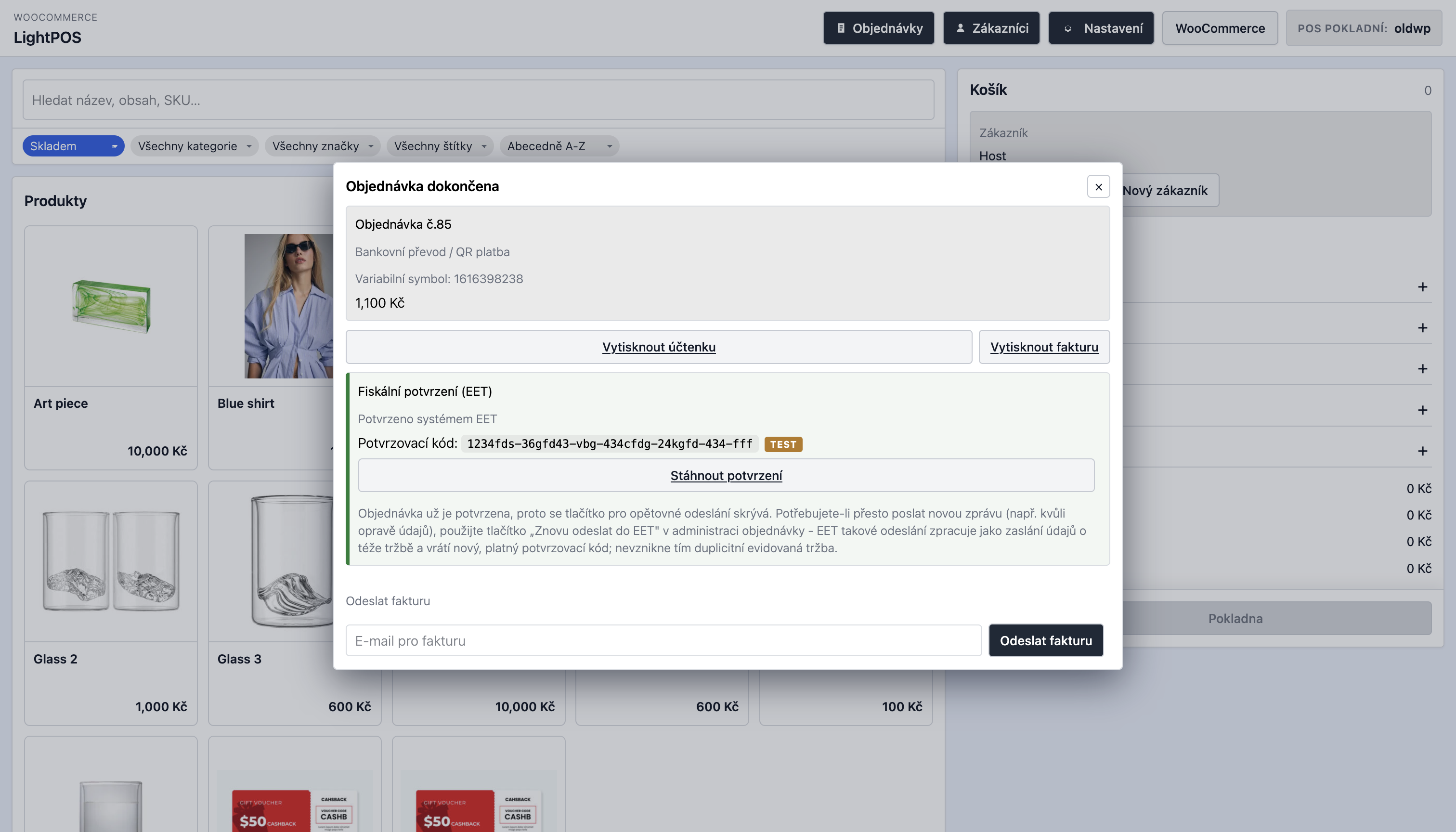
LightPOS je pokladní systém pro rychlý prodej: podporuje QR platby v CZK a EUR, multiccreuncy, správu zákazníků a práci s existujícími objednávkami přímo v POS. Obsahuje integraci s pluginem PDF Invoices & Packing Slips for WooCommerce pro tisk a odesílání faktur a s pluginem EET 2.0 pro WooCommerce pro elektronickou evidenci tržeb. LightPOS může po dokončení prodeje odeslat tržbu do EET 2.0, zobrazit stav evidence přímo v POS a zpřístupnit fiskální potvrzení.
V LightPOS můžete také přímo definovat vlastní zákaznická meta pole (např. IČ, DIČ), která lze programově využít ve vlastních pracovních postupech, například ve fakturách, e-mailových šablonách nebo jiných integracích na míru.
Hlavní funkce
- Samostatná responzivní pokladna s nastavitelnou URL adresou, zobrazením produktů a přehlednými ovládacími prvky pro obsluhu.
- Rychlé vyhledávání produktů a nastavitelné filtrování podle skladu, kategorií, značek, štítků, jazyka a klíčových slov.
- Volba filtrů produktů, které uvidí obsluha pokladny.
- Podpora variantních produktů, detailu produktu v dialogu a přidávání do košíku s kontrolou skladu.
- Přidávání vlastních položek s vlastním názvem, SKU, DPH a cenou.
- Sbalitelné nástroje košíku pro kupóny, ruční poplatky, slevy a dopravu.
- Platba v hotovosti se zadanou přijatou částkou a automatickým výpočtem vrácené hotovosti.
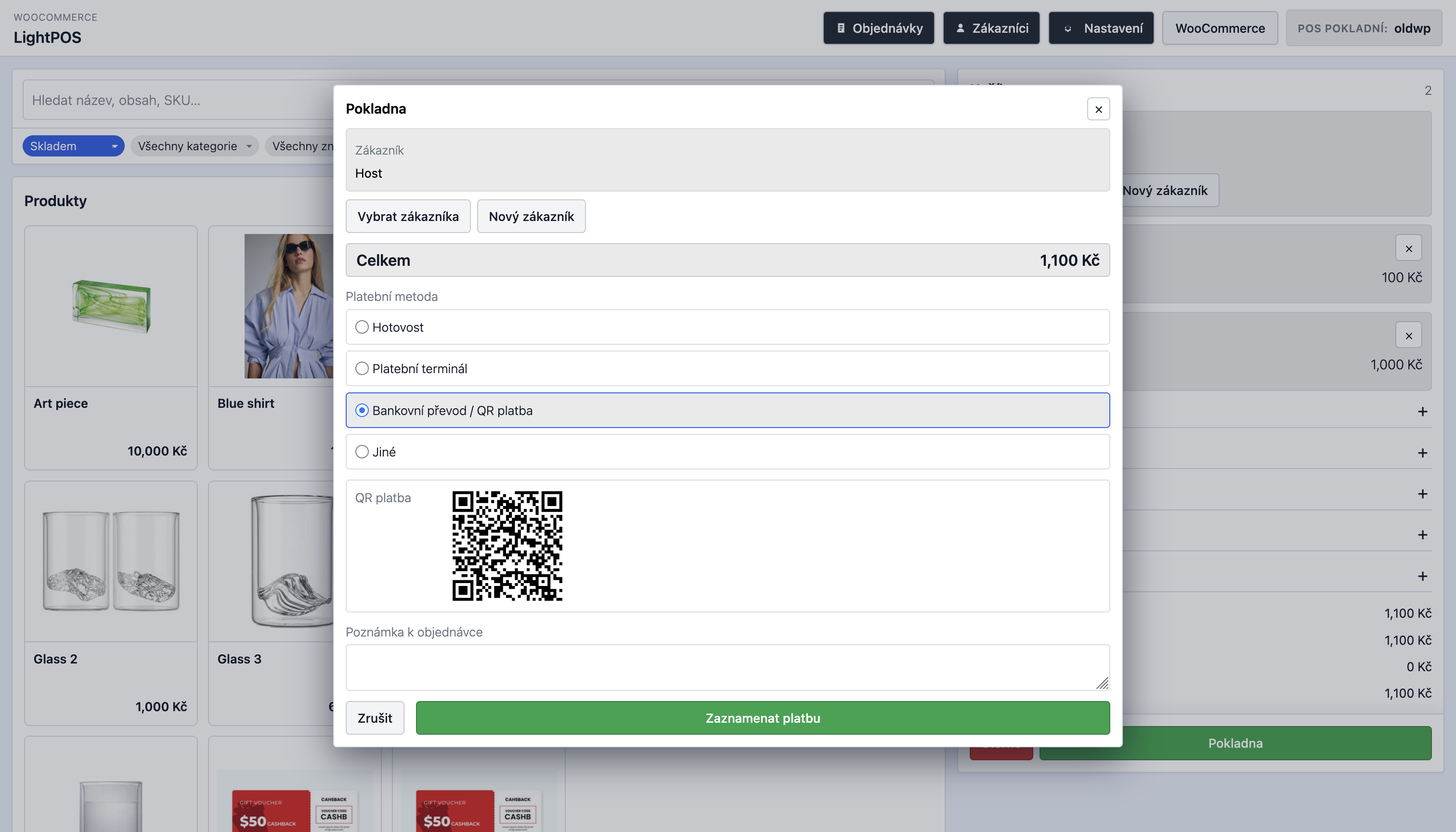
- QR platby pro CZK (SPAYD) a EUR (EPC) s ověřením bankovních údajů bez služby třetí strany.
- Storno aktuálního prodeje z košíku.
- Vyhledávání, vytváření, úprava a přiřazení zákazníků během platby.
- Nastavitelná vlastní zákaznická pole s popisky připravenými pro Polylang a WPML.
- Možnost programově znovu použít vlastní zákaznická pole ve fakturách, e-mailech a dalších integracích na míru.
- Nastavitelné platební metody POS s mapováním stavů objednávek.
- Nastavitelný jazyk rozhraní POS s češtinou a angličtinou.
- Kompatibilita s WooCommerce HPOS a práce s objednávkami přes WooCommerce CRUD API.
- Multicurrency integrace s CURCY a FOX Currency Switcher.
Objednávky, stavy a e-maily
- Plugin označuje objednávky vytvořené v POS, aby je bylo možné spravovat odděleně od běžných objednávek e-shopu.
- Přidává vlastní stav WooCommerce pro dokončené POS objednávky.
- Registruje vlastní e-mailovou šablonu účtenky pro POS objednávky.
- Volitelně přikládá účtenku LightPOS jako HTML soubor k e-mailu s účtenkou.
- Umožňuje přepsat šablonu účtenky v child šabloně pro potřeby konkrétního obchodu nebo legislativy.
- Integruje se s pluginem WooCommerce PDF Invoices & Packing Slips od WP Overnight pro tisk a odeslání PDF faktur.
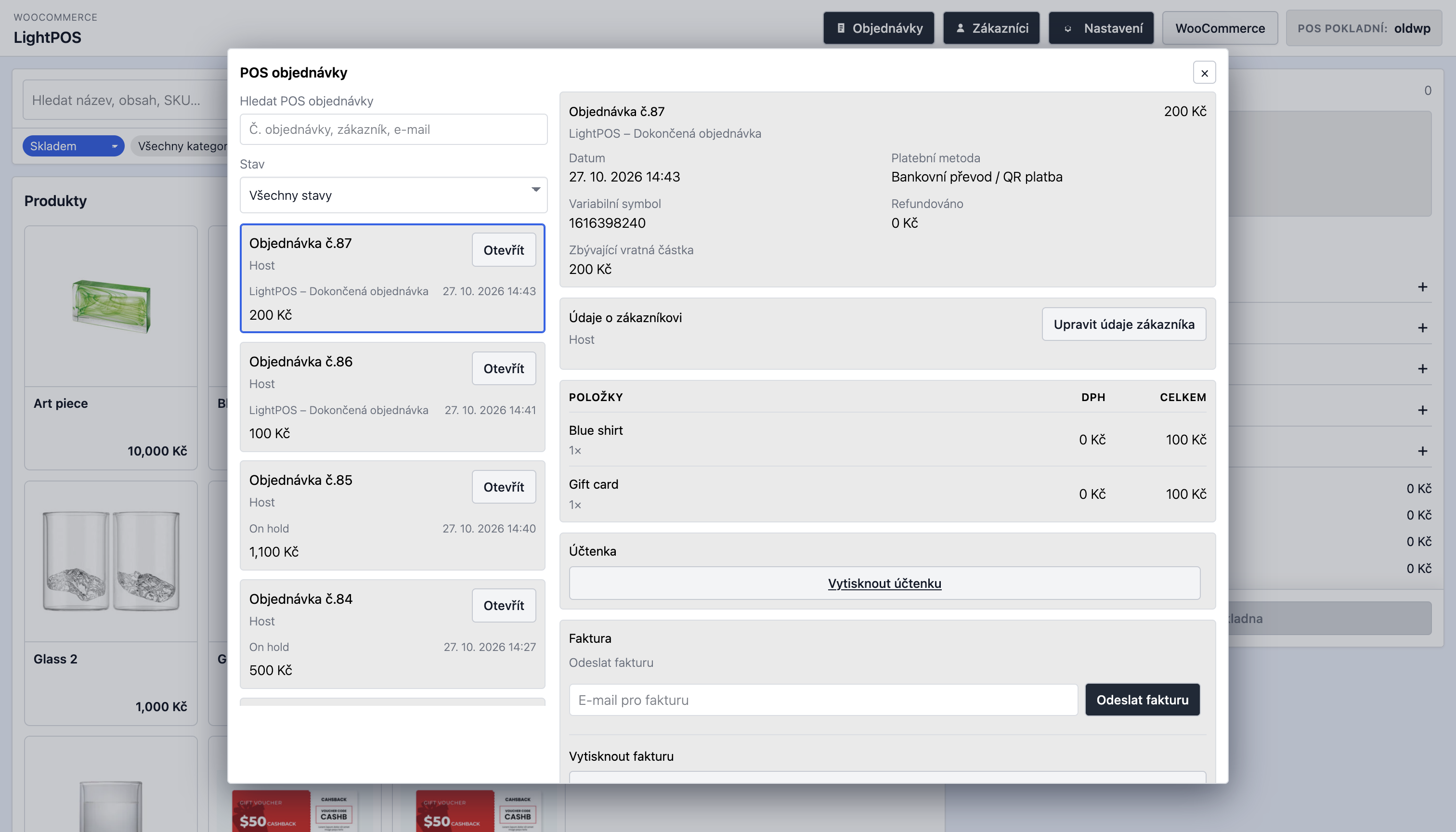
- Pozdější ruční odeslání faktury nebo účtenky z detailu objednávky.
- Akce pro zobrazení detailu a úpravu údajů zákazníka, zrušení objednávky a vytvoření vratky s volitelným naskladněním.
Screenshots

Installation
- Nahrajte plugin do
/wp-content/plugins/nebo jej nainstalujte do lokálního projektu. - Aktivujte WooCommerce.
- Aktivujte LightPOS – Pokladní systém (POS) pro WooCommerce.
- Otevřete
LightPOS > Nastavenía nastavte odkaz POS, filtry, měny, platební metody a zákaznická pole. - Otevřete pokladnu přes
LightPOS > Otevřít POS.
FAQ
-
Podporuje HPOS?
-
Ano. Plugin podporuje kompatibilitu s HPOS a pro práci s objednávkami i zákazníky používá WooCommerce CRUD API.
-
Mohu upravit účtenku v child šabloně?
-
Ano. Zkopírujte šablonu účtenky do child šablony a upravte ji tam. LightPOS podporuje přepsání v
lightpos/i starší cestuminimal-pos/pro zpětnou kompatibilitu.
Reviews
There are no reviews for this plugin.
Contributors & Developers
“LightPOS – Pokladní systém (POS) pro WooCommerce” is open source software. The following people have contributed to this plugin.
Contributors
“LightPOS – Pokladní systém (POS) pro WooCommerce” has been translated into 1 locale. Thank you to the translators for their contributions.
Translate “LightPOS – Pokladní systém (POS) pro WooCommerce” into your language.
Interested in development?
Browse the code, check out the SVN repository, or subscribe to the development log by RSS.
Changelog
0.1.30
- Fixed CURCY multi-currency POS cart requests sending duplicate currency cookies during cart serialization. The selected currency is now applied at most once per request, preventing oversized response headers and production 502 errors.
0.1.29
- Updated POS Cashier role to access WooCommerce Products.
0.1.28
- Hid WooCommerce dashboard widgets for POS Cashiers because WooCommerce requires broad store-management and reports permissions to load them.
0.1.27
- Fixed POS Cashier access to WooCommerce order screens in wp-admin without granting broad post-editing or WooCommerce-management permissions.
- Fixed the WordPress admin-menu access check for creating WooCommerce orders as a POS Cashier.
0.1.26
- Made the POS ready for interaction immediately: customer selection, product actions and filters no longer wait for the startup REST requests.
- Hydrated the initial server-rendered cart and product list in the browser, preventing the customer panel from appearing late and eliminating the initial product-grid flash.
0.1.25
- Fixed CURCY currency switching in LightPOS by persisting the selected POS currency in the WooCommerce session and restoring it for every POS REST request.
- Prevented non-base-currency sales when CURCY has no explicit fixed price for the product or variation; affected products are unavailable instead of displaying a converted base price with a different currency symbol.
- Added clear currency-switch failure handling in the POS API.
0.1.24
- Added configurable QR bank payments for CZK and EUR, including Czech account, IBAN and SWIFT/BIC validation.
- Added locally generated SPAYD and EPC QR codes, with a unique server-generated payment reference. Czech QR payments use this value as the variable symbol; completed bank-transfer orders retain it in WooCommerce order metadata and display it in LightPOS and WooCommerce order details.
- Fixed REST cart-session restoration and immediate session persistence for all POS cart changes, preventing products and cart adjustments from disappearing between requests.
- Added organized Czech LightPOS settings tabs, QR-payment settings, PDF invoice guidance, and English translations for new POS labels.
- Refined checkout, product imagery, dialogs, receipt customization guidance, and POS toolbar controls.
- Hardened the POS inline configuration and QR payload handling.
0.1.23
- Added content-based asset cache busting and early no-cache handling for the POS route.
- Added compatibility with current and legacy CURCY / Woo Multi Currency releases.
- Ensured WooCommerce administrator cancellation notices are sent when eligible LightPOS orders are cancelled.
0.1.22
- Refined the order-items table header styling.
0.1.21
- Removed padding from the order-items table header.
0.1.20
- Restored the order-items header to a normal background with black text and removed temporary cart calculation error logging.
0.1.19
- Simplified the order-items card and styled its column header as a black table header.
0.1.18
- Made the manual-discount amount field span the full form width.
0.1.17
- Added a “Print invoice” section heading above the invoice print action in the POS order detail.
0.1.16
- Simplified invoice-send wording and use “Send invoice” instead of “Resend invoice” in the order detail.
0.1.15
- Combined invoice sending and printing into one invoice card in the POS order detail, with email sending shown before printing.
0.1.14
- Simplified refund wording in Czech and English, and hide the “Create refund” opener after the itemised refund form is opened.
0.1.13
- Removed the manual-discount title field. Discounts use the localized default name automatically.
0.1.12
- Fixed zero-decimal currency rounding for VAT-inclusive manual delivery. The stored delivery amount now matches the whole-currency amount shown in the POS and no longer creates a one-koruna total difference.
0.1.11
- Improved diagnostic logging for POS cart-calculation discrepancies.
0.1.10
- Fixed manual VAT-inclusive discounts combined with a coupon: their VAT allocation now follows WooCommerce’s post-coupon calculation order.
- Product prices in the POS are rounded to the active currency’s configured precision before VAT calculation, so visible and charged amounts agree.
- An unnamed manual discount now defaults to “Discount” (“Sleva” in Czech), and fee, discount, and shipping panels close after their line is added.
0.1.9
- Fixed VAT allocation for VAT-inclusive POS discounts after coupon discounts, preventing whole-koruna total discrepancies.
- Manual delivery rows now display the calculated gross amount used by the WooCommerce cart total.
0.1.8
- Improved the POS order refund workflow with itemised product, fee, and shipping refunds, VAT-inclusive refund amounts, and clearer refund controls.
- Cancelling an invoiced POS order now creates a full WooCommerce refund so compatible invoice plugins can generate a credit note.
- Improved the checkout, order-detail, and refund UI, including VAT and total displays.
0.1.7
- Updated the WC Multi-Stock integration for WCMS 1.0.7: stock is allocated before checkout completes; shortages leave the cart intact and do not create an invoice.
- Cashier-selected locations remain fixed. Stock display and validation subtract online reservations, and location inventory cannot be oversold using a confirmation override.
- Refunds use explicit WooCommerce item lines with per-item quantities and refund amounts. Returned quantities are validated against prior refunds, and restocking can be selected separately.
- Deploy both LightPOS 0.1.7 and WCMS 1.0.7 together when using the location stock integration.
0.1.6
- Replaced legacy POS header controls with a settings modal for currency and interface language selection.
- Added a return link to WordPress admin in both the POS header and the settings modal.
- Improved admin settings UX with clearer language-setting descriptions.
0.1.5
- Fixed CSS/JS inlining, escaping and few other minor issues.
- Added translation updates for the new admin copy and bumped the plugin version for the settings/documentation refresh.
0.1.4
- Added plugin packaging fixes for WordPress.org submission, including license metadata and review-driven compatibility cleanups.
- Improved Plugin Check compliance for template loading, escaping, and packaging expectations.