

Description
HandL AI Connector Access Control lets administrators allow/deny AI Client prompt execution on a per-plugin basis using the wp_ai_client_prevent_prompt filter introduced with the WordPress AI Client.
Default behavior is allow.
Learn mode (Audit & log tab) logs every AI Client call without blocking, so you can discover callers before enabling deny rules on the Plugin rules tab.
Emergency kill switch blocks all AI Client calls except plugins you list as exceptions.
Caller attribution is best-effort and is determined by inspecting the PHP call stack and mapping file paths to installed plugins.
Privacy / Data
This plugin does not send data to any external service.
If you enable recent-call logging in Settings HandL AI Connector Access Control, it stores a local log in the WordPress options table containing:
- Timestamp
- Allow/deny decision
- AI Client operation (e.g.
generate_text,is_supported_for_text_generation) - Provider and model when set on the prompt builder (or model preferences)
- Truncated prompt preview and selected generation config (best-effort)
- Input and output token counts when the AI Client completes a generation (best-effort)
- Best-effort calling plugin (plugin basename) and source file
- Current user id and display name
- Request URI
Logs are kept as a count-based ring buffer (default 200 entries, configurable 20–1000). There is no time-based TTL—older rows drop only when the buffer is full.
Logging is disabled by default.
Screenshots
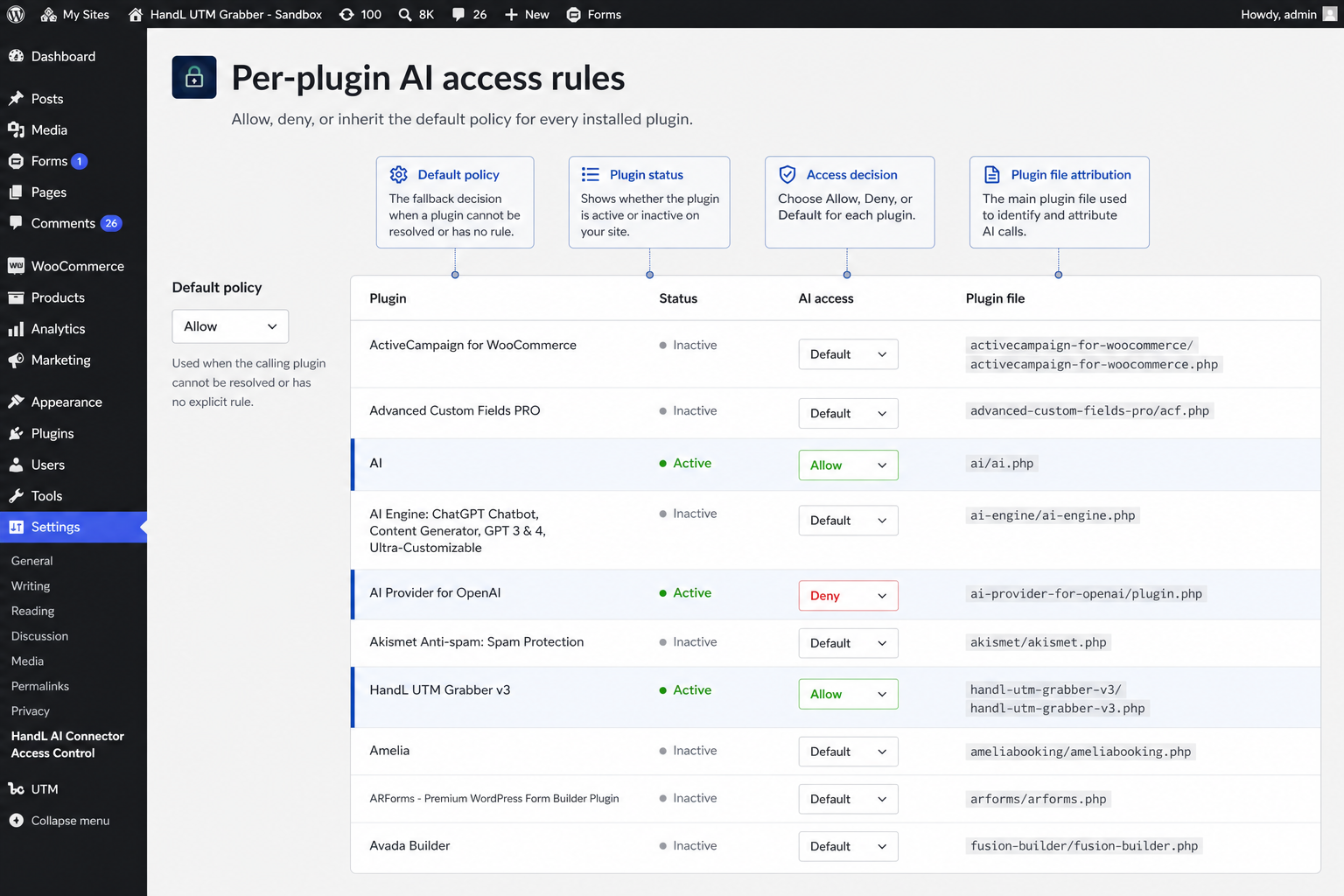
Per-plugin AI access rules — set a default policy and allow, deny, or inherit for each installed plugin. 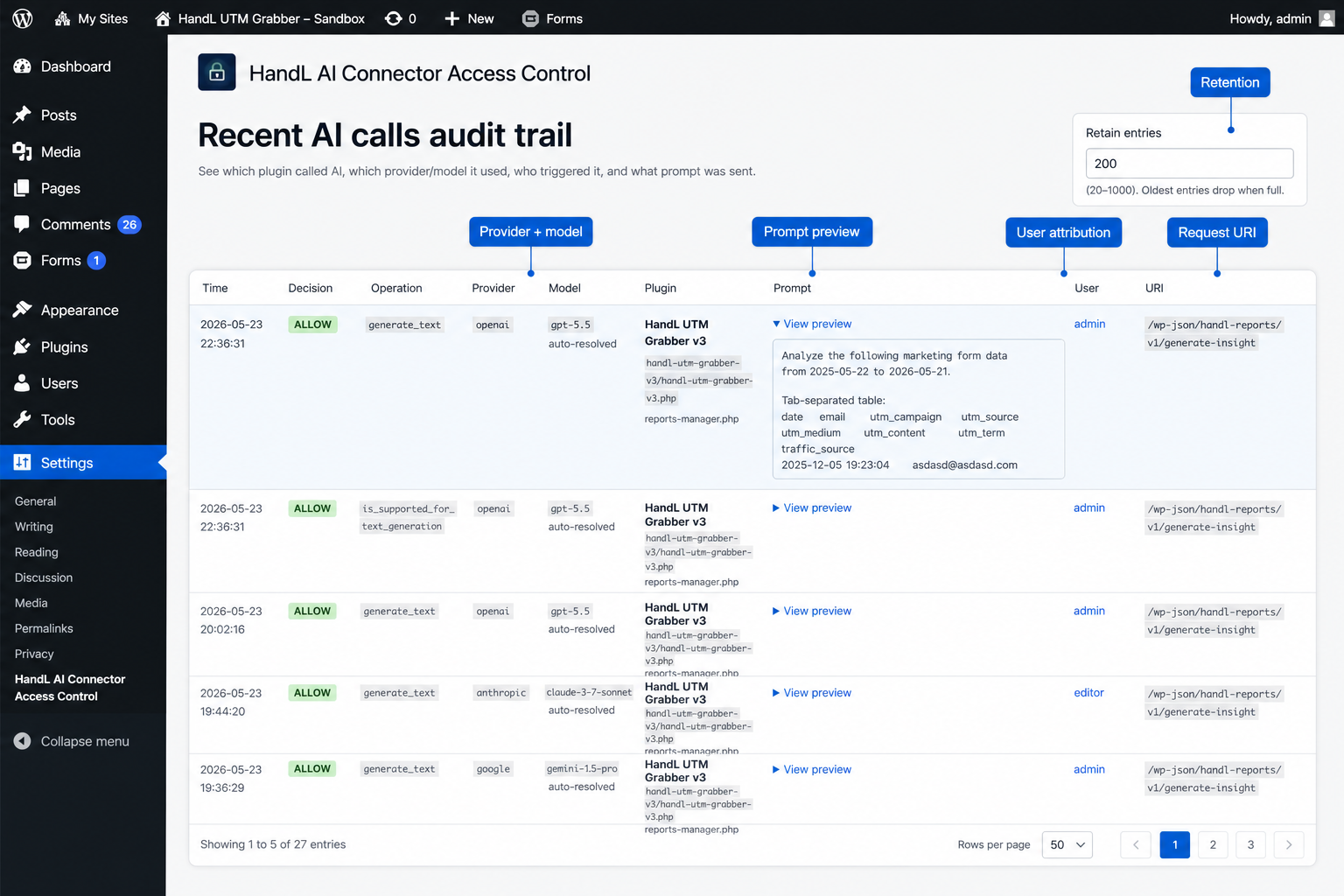
Recent AI calls audit trail — review provider, model, prompt preview, user, and request URI for each AI Client call.
Installation
- Upload the plugin folder to
/wp-content/plugins/handl-ai-connector-access-control/ - Activate the plugin through the Plugins screen in WordPress
- Go to Settings HandL AI Connector Access Control to configure plugin rules
FAQ
-
Does this stop all AI usage?
-
Only AI calls made through the WordPress AI Client APIs that pass through
wp_ai_client_prevent_prompt. -
Is attribution perfect?
-
No. It is best-effort and may be unknown or ambiguous for some execution paths (cron, REST bootstraps, shared libraries, MU plugins).
Reviews
There are no reviews for this plugin.
Contributors & Developers
“HandL AI Connector Access Control” is open source software. The following people have contributed to this plugin.
Contributors
Translate “HandL AI Connector Access Control” into your language.
Interested in development?
Browse the code, check out the SVN repository, or subscribe to the development log by RSS.
Changelog
1.0.6
- Recent-call log records input (prompt) and output (completion) token counts via
wp_ai_client_after_generate_resultwhen logging is enabled. - Usage insights tab: aggregated call counts and token sums/peaks by plugin, provider, model, and operation from the retained log.
- Learn mode (Audit & log tab): log every AI Client call without blocking; suggested rules from the log; “would enforce” decision in the audit trail.
- Emergency kill switch: block all AI Client calls with optional per-plugin exceptions.
- Quick actions on the recent-call log: allow or deny a plugin in one click.
1.0.5
- Added WordPress.org plugin directory banners and screenshots.
1.0.4
- Enriched recent-call log with provider, model, operation, and truncated prompt preview; improved admin log table and documented count-based retention (no TTL).
1.0.3
- Added logos + branding
1.0.2
- Renamed plugin to HandL AI Connector Access Control (slug
handl-ai-connector-access-control). Prefixed options, constants, menus, and forms per WordPress.org guidelines. Migrates settings from previous plugin slugs when present.
1.0.0
- Initial release (submitted as AI Not).