

Description
ChiroRank™ gives chiropractors three essential SEO tools in one lightweight plugin:
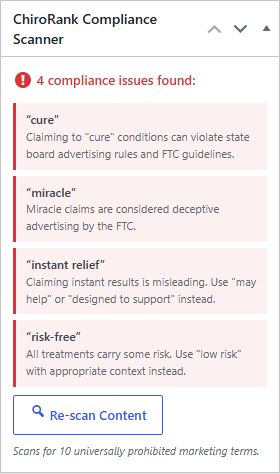
Compliance Scanner – Scans your post and page content for 10 universally prohibited marketing terms that can get you in trouble with state boards and the FTC. Terms like «cure,» «guaranteed results,» and «100% effective» are flagged with explanations of why they violate advertising rules and what to use instead.
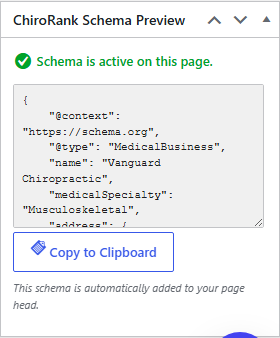
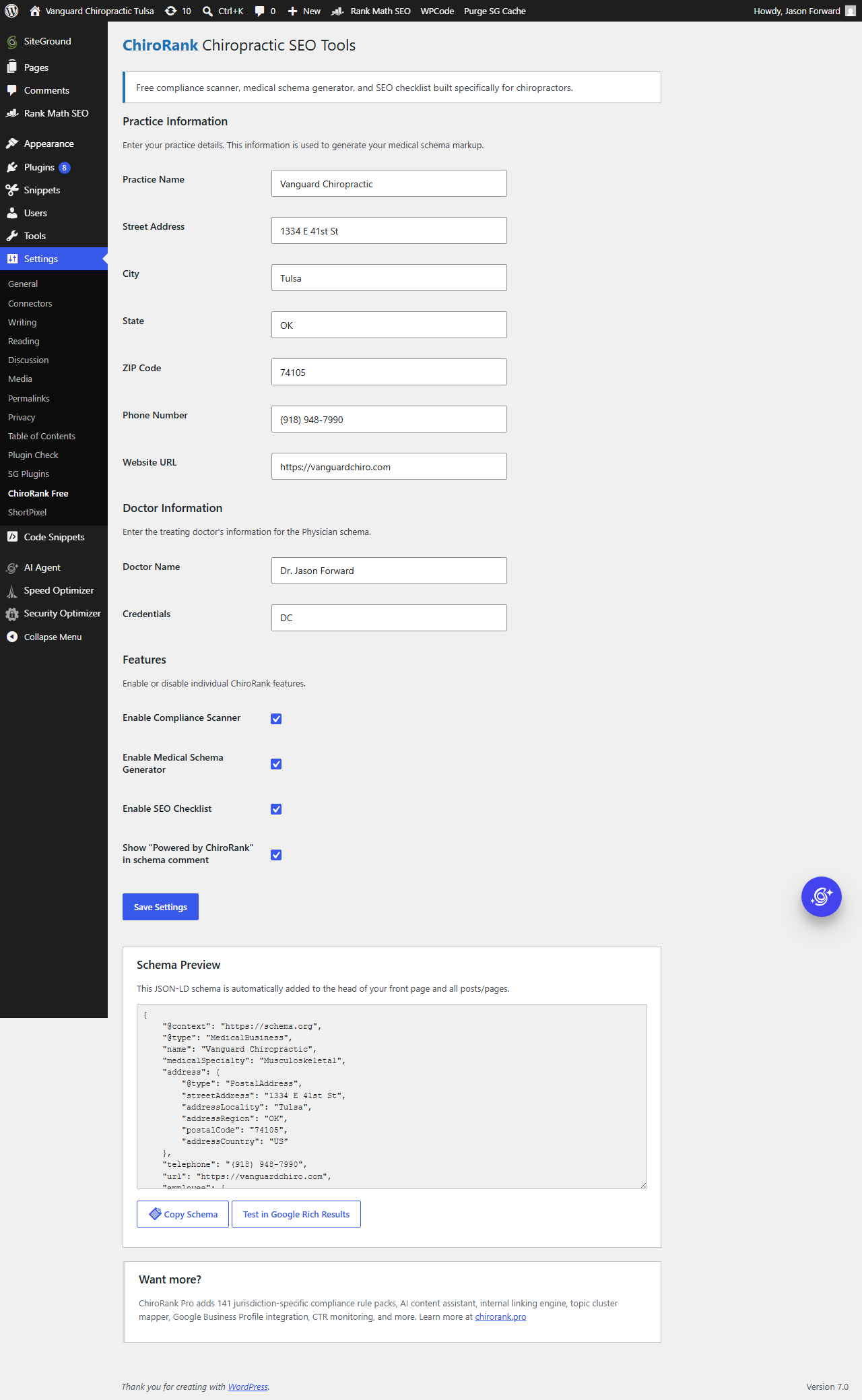
Medical Schema Generator – Generates proper MedicalBusiness and Physician JSON-LD structured data from your practice information. Enter your details once in settings and the schema is automatically added to your pages. One-click copy to clipboard for manual use.
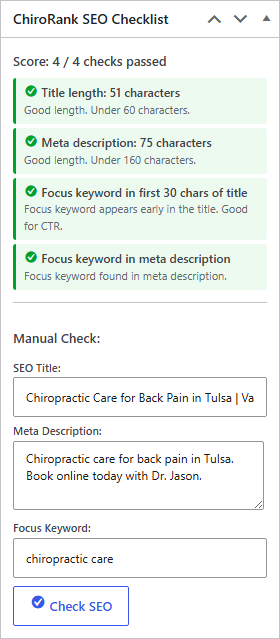
SEO Title and Meta Checklist – Checks your SEO title length (under 60 characters), meta description length (under 160 characters), focus keyword placement in the first 30 characters of your title, and focus keyword presence in your meta description. Works with Rank Math and Yoast SEO, or use the manual input fields.
Presence Score – A simple 0 to 100 score in the post editor that combines your SEO checklist, compliance, and schema signals into one number, with the top things to fix. The score is calculated entirely on your own site.
Quick setup wizard – A short first-run wizard asks three questions so you can get value fast, then points you to a free AI-visibility check on chirorank.pro (optional) that shows whether ChatGPT and Google AI name your clinic. That check runs on our website, not from your site.
Who is this for?
Any chiropractor running a WordPress website who wants to:
- Avoid compliance violations in their marketing content
- Add proper medical schema markup without touching code
- Check basic SEO best practices before publishing
Works with your existing SEO plugin
ChiroRank™ detects Rank Math and Yoast SEO automatically. It pulls your existing SEO title, meta description, and focus keyword for the checklist. No SEO plugin? No problem. Use the manual input fields.
Lightweight and focused
No bloat. No unnecessary features. Three tools that do exactly what they say. The plugin loads only on admin screens where it is needed.
Screenshots
Installation
- Upload the
chirorankfolder to/wp-content/plugins/ - Activate the plugin through the Plugins menu
- Go to Settings > ChiroRank™ Free
- Enter your practice information for schema generation
- Start editing posts and pages to see the compliance scanner and SEO checklist in the sidebar
Manual Installation
- Download the plugin zip file
- Go to Plugins > Add New > Upload Plugin
- Choose the zip file and click Install Now
- Activate the plugin
FAQ
-
Do I need Rank Math or Yoast to use this plugin?
-
No. All three features work without any SEO plugin. However, when Rank Math or Yoast is active, the SEO checklist automatically pulls your existing title, meta description, and focus keyword instead of requiring manual input.
-
What terms does the compliance scanner check for?
-
The scanner checks for 10 terms that are universally prohibited across US chiropractic advertising rules: «cure,» «miracle,» «guaranteed results,» «instant relief,» «risk-free,» «permanent fix,» «eliminate pain,» «100% effective,» «never need surgery,» and «prevent all disease.»
-
Does this plugin slow down my site?
-
No. The plugin only loads on admin screens (post editor and settings page). It adds a small JSON-LD schema script to your front-end pages, which is standard structured data that Google recommends.
-
Can I disable individual features?
-
Yes. Each feature (compliance scanner, schema generator, SEO checklist) can be toggled on or off in Settings > ChiroRank™ Free.
-
Does the schema output pass Google validation?
-
Yes. The generated MedicalBusiness and Physician schema follows schema.org specifications. You can test it using the Google Rich Results Test tool, which is linked from the settings page.
-
What is the paid ChiroRank™?
-
The paid ChiroRank™ is a separate premium plugin with additional features like jurisdiction-specific compliance rules, AI content assistance, internal linking tools, and more. This free version is fully functional on its own and is not a limited trial.
-
Will this conflict with other schema plugins?
-
ChiroRank™ outputs its schema as a separate JSON-LD block, which is the method Google recommends. Multiple JSON-LD blocks on a page are valid and will not conflict. If you already have MedicalBusiness schema from another source, you may want to disable the schema feature in settings to avoid duplication.
-
I installed it and nothing happened. What is wrong?
-
Nine times out of ten the practice name is missing. The plugin builds your schema from your
practice information, so with no practice name there is nothing to add to your site, and the
plugin sits there doing nothing without saying so. Versions before 1.4.0 did not even ask for
it during setup.Open ChiroRank and enter your practice name. Updating the plugin on its own will not fix it,
because the missing detail is in your settings, not in the code.To confirm it is working, open any published page on your site, view the page source, and
search for MedicalBusiness. If that block is there, the plugin is doing its job. The settings
page also links Google’s Rich Results Test. -
My website is not WordPress. Can I still use ChiroRank?
-
Not this plugin. ChiroRank Free is a WordPress plugin, so it cannot install on Wix,
Squarespace, Webflow, GoDaddy’s site builder, or a custom-built site.There is a hosted version that does not need WordPress at all. Visit chirorank.pro and use
the hosted dashboard instead. Everything the plugin does is available there, and it works
whatever your website is built on. -
Is my data sent anywhere?
-
No. The plugin makes no external API calls and does not transmit any information from your site. All scanning, scoring, and schema generation happen locally on your WordPress site. The plugin does include an optional link to a free AI-visibility check on chirorank.pro. If you choose to click it, that check runs on our website in a new tab. The plugin itself sends nothing.
Reviews
There are no reviews for this plugin.
Contributors & Developers
“ChiroRank™ – Chiropractic SEO Tools” is open source software. The following people have contributed to this plugin.
Contributors
Translate “ChiroRank™ – Chiropractic SEO Tools” into your language.
Interested in development?
Browse the code, check out the SVN repository, or subscribe to the development log by RSS.
Changelog
1.6.0
- New: warns you if a robots.txt file on your server is blocking the whole site. WordPress makes its own robots.txt, but if a real file exists on the server it wins and overrides every setting in WordPress and in any SEO plugin. These files usually arrive with a migration or a copy of a staging site, and nothing in WordPress will tell you it is there
- New: warns you if your page addresses are set to Plain, which publishes every page at /?p=123 instead of /chiropractor-in-your-city/ and throws away the words in your URLs on every page at once
- New: warns you if your homepage specifically is set to hide from search engines. Hiding one page is sometimes deliberate; hiding the homepage almost never is
- New: ChiroRank now warns you, on every admin screen, if your site is set to hide from Google. WordPress has a checkbox under Settings > Reading that tells search engines not to list you. It is correct while a site is being built and ruinous once it is live, and nothing else on your site looks wrong while it is on. We have seen a real practice site sit hidden for thirteen days after launch before anyone noticed. The warning links straight to the setting and disappears the moment you fix it. It cannot be dismissed while your site is still hidden, on purpose
1.5.0
- The plugin now works the moment you activate it. Previously it produced no schema at all until you typed a practice name, so a fresh install looked like it was doing nothing. It falls back to your site title, and everything you fill in afterwards makes the schema better
- Your Site Icon is now used as your logo and image in schema. This is the mark Google can show beside your search result, and it needs no setup because WordPress already has the icon
- Opening hours. A new section under Settings, one row per day. Whether you are open right now is one of the strongest local search signals there is, and the plugin previously published none of it. Leave a day blank if you are closed
- Google Business Profile URL. One field, and it links your website and your Google listing together as the same business
- Your city now also appears as the area you serve
- Your practice and your doctor are now linked to each other in the schema instead of being two separate descriptions, so search engines can tell they are the same clinic
- Times you enter are checked before they are saved. Something like «9am» is rejected rather than published to Google as a broken value
1.4.1
- Added two answers to the FAQ that people were having to work out for themselves: what to do when the plugin installs but nothing appears to happen (nine times out of ten it is a missing practice name, and the fix takes ten seconds), and what to use if your website is not WordPress at all
- No code changes. This release is help text only
1.4.0
- IMPORTANT FIX: the setup wizard now asks for your practice name. Without it the schema markup, the main thing this plugin does, was never being added to your site. If you installed an earlier version, open ChiroRank and enter your practice name to switch it on
- The wizard now asks for your practice name and city before the other questions, so the plugin does something useful the moment you finish
1.3.0
- Added a one-time note asking for a WordPress.org review. It only appears after you have owned the plugin a week AND actually set it up, never on the setup screen, and «I already did» silences it for good
1.2.1
- Fixed the setup wizard so it opens correctly (it was bouncing to the dashboard on some sites)
- Added a «Build a new website» option to the goal question
- Minor copy tidy on the wizard intro
1.2.0
- The setup wizard now carries your answers to the optional AI-visibility check on chirorank.pro, so the assessment there is ready without retyping. Still optional, still opens in a new tab, and the plugin still transmits nothing from your site
- Clearer, gentler prompts pointing to the free AI-visibility check and the optional assessment
1.1.0
- Added a first-run setup wizard (three quick questions, saved locally)
- Added a local Presence Score in the post editor that combines the SEO checklist, compliance, and schema signals
- Added an optional link to a free AI-visibility check on chirorank.pro. The plugin still makes no external calls and transmits nothing from your site
- Fixed the Settings link on the Plugins page so it opens the correct settings screen
1.0.3
- Added campaign tracking (UTM) to the paid ChiroRank™ learn-more link so upgrade interest can be measured
1.0.2
- Enqueue all admin scripts through wp_enqueue_script and wp_add_inline_script (no inline script tags)
- Standardized all PHP function, class, constant, and option prefixes to the ChiroRank_Free family for uniqueness
- Aligned the text domain with the plugin slug for correct internationalization
1.0.0
- Initial release
- Compliance scanner with 10 universally prohibited terms
- Medical schema generator (MedicalBusiness + Physician JSON-LD)
- SEO title and meta checklist with Rank Math and Yoast support
- Settings page with practice information management
- Schema preview with one-click clipboard copy