
Description
Your WooCommerce orders screen shows what was ordered and how much it cost. It tells you almost nothing about who is ordering, why an order might need special attention, or what should happen differently for this one versus the last one.
The result is a workflow built on clicking. Staff open individual orders to check customer history. They miss a first-time buyer who deserved a welcome note, a serial returner who should have been reviewed before dispatch, or a VIP customer whose tenth order deserved better than the default experience.
OrderBadger adds coloured badge pills to your WooCommerce orders screen based on rules you write in plain English. The moment an order arrives, matching badges appear. No clicking required. No developer involvement. No changes to your order status, your customer emails, or your integrations.
Badges, not statuses – the difference matters. Custom order status plugins change the actual WooCommerce order status, which triggers customer emails, distorts analytics, and can break payment gateway integrations. OrderBadger badges are a visual layer only. Your order stays «Processing». WooCommerce, Stripe, your shipping plugin – none of them see anything different.
Write what you want in plain English. No dropdowns, no nested condition builders, no ceiling where you need a developer. Describe what matters to your business in a sentence:
- «New customer account created in the last 7 days, order total over £200, requesting express delivery» (see example)
- «Customer has placed 10 or more orders and has purchased from the same category at least 5 times» (see example)
- «Repeat customer returning after more than 90 days, whose current order exceeds their average spend» (see example)
None of these are possible in a standard condition builder without developer help.
Know who’s ordering, not just what they ordered. OrderBadger is the only WooCommerce plugin that surfaces customer lifecycle signals directly in the orders screen – first-time buyers, loyal repeat customers, lapsed returners, serial returners, VIP whales, at-risk customers about to churn. These signals exist in your data but are invisible until now.
Features:
Customer intelligence:
- Badge first-time buyers, loyal customers, VIPs, lapsed returners, and serial returners
- Surface customer lifecycle signals at the order level where your team works
- Identify trade and wholesale patterns automatically
Operational:
- Flag heavy, fragile, international, and oversize orders for special handling
- Enforce compliance checks – age verification, hazmat, quantity limits
- Route orders to the right warehouse or fulfilment path
Rules and automation:
- Write rules in plain English – the AI compiles them automatically
- Start from 150+ ready-made templates grouped by store type
- Preview rules against recent orders before activating
- 40+ order fields: customer history, item details, shipping, stock, time of day
Workflow:
- Badge Inbox for reviewing, assigning, and tracking badge activity
- Interactive badges with structured responses (e.g. Pass / Fail)
- Assign badges to roles, claim tasks, and reassign across your team
- SLA tracking with overdue indicators and snooze
- Audit trail of badge decisions and response history
- Daily digest emails summarising outstanding work
Technical:
- Non-destructive – badges never change order status or trigger emails
- Works with WooCommerce HPOS (High-Performance Order Storage)
- 8 badge colours, order or item level, severity levels
- Manually pin or remove badges when needed
How it works:
- Open the Build tab – pick a starter template or create your own badge.
- Describe your rule in plain English.
- Preview results against recent orders.
- Activate – matching orders are badged automatically from now on.
- Review follow-up items in the Badge Inbox when needed.
Guides and examples:
For more ideas, browse the full rule library (150+ ready-made templates) or read the how-to guides:
Customer intelligence:
- How to flag repeat customers in WooCommerce
- How to spot first-time customers in WooCommerce
- How to track customer lifecycle stages in WooCommerce
Revenue protection:
- How to highlight high-value orders in WooCommerce
- How to detect suspicious or risky orders in WooCommerce
- How to protect order margins in WooCommerce
- How to reduce WooCommerce returns with order flagging
Operations:
- How to flag shipping exceptions in WooCommerce orders
- How to streamline WooCommerce warehouse picking and packing
- How to enforce compliance checks on WooCommerce orders
Free tier:
The free plan includes unlimited badges (visual and interactive), manual badge pinning, the Badge Inbox, and up to 3 active automated rules. Assignment, SLA tracking, audit trail, and digest notifications are available with a Pro subscription.
External services
This plugin connects to the SmartFact.ai API to compile and evaluate badge rules. No data is transmitted until you explicitly take an action that requires it.
What data is sent and when:
- On connection (user-initiated): Your site domain and the email address of the currently logged-in WordPress user are sent to provision an API key. This only happens when you click «Connect Account» or approve the connection consent modal.
- When authoring rules (user-initiated): Your plain-English rule descriptions are sent for compilation into evaluable logic. This only happens when you click «Check Rule» or «Save Rule», or when you apply a starter template.
- When evaluating orders (automatic, after activation): When an order reaches the configured trigger status, an order snapshot is sent for evaluation. The snapshot includes: order ID, order number, status, currency, date, totals (total, subtotal, shipping, tax, discount), line items (product IDs, variation IDs, SKUs, names, quantities, subtotals, totals, tax, weights, dimensions, item meta, product categories), shipping methods (method ID, title, total), shipping metadata (country, state, outward postcode), payment method and title, customer ID, customer order count, and billing/shipping postcodes and countries. Only fields referenced by your active rules are computed and sent.
- What is NOT sent: No customer names, email addresses, phone numbers, or street addresses are ever transmitted. Badge names, colours, and configuration remain in your WooCommerce database and are never sent externally.
- No tracking: The plugin does not send analytics or usage telemetry. External requests occur only for the actions described above.
SmartFact.ai service links:
Screenshots
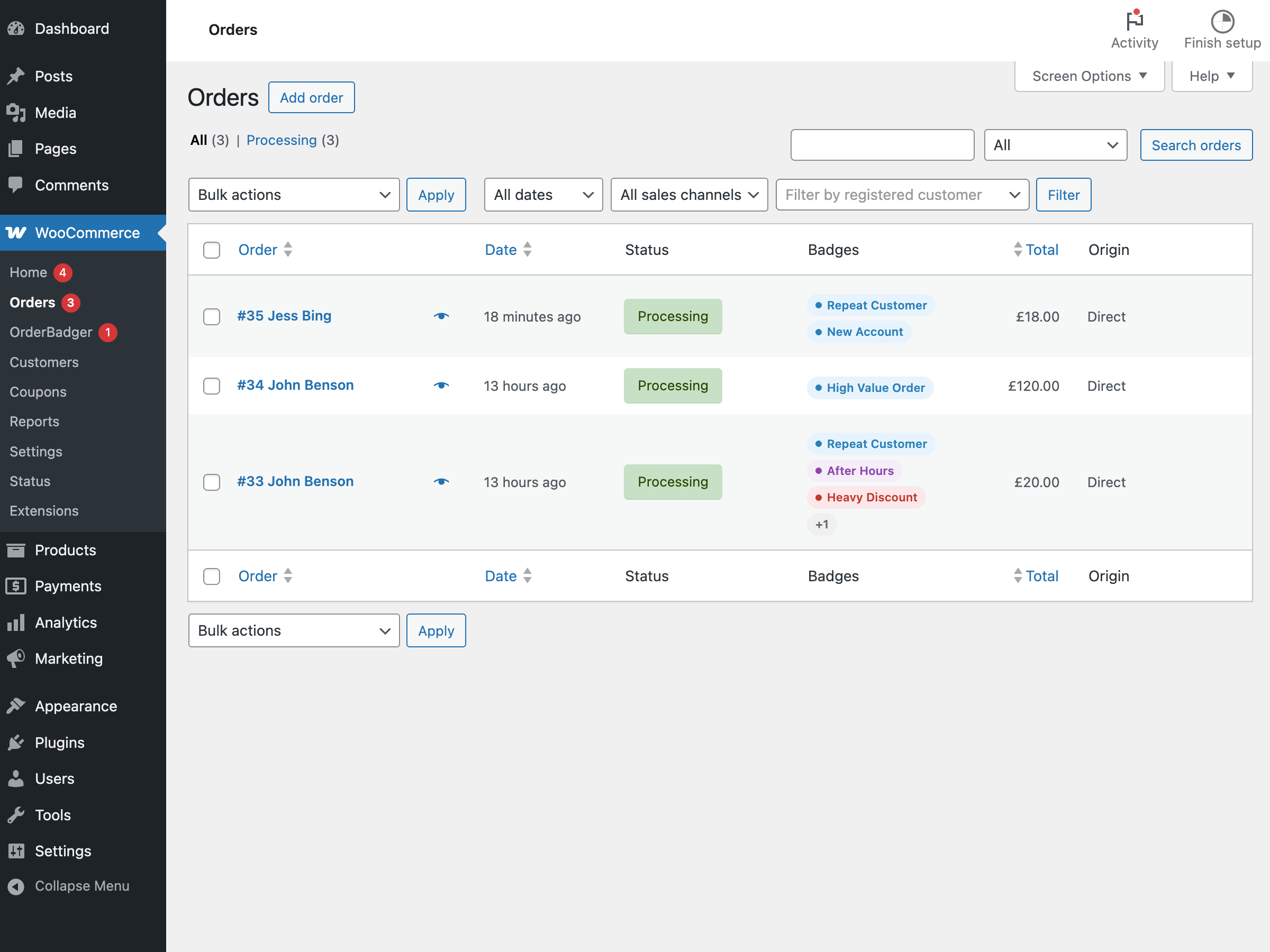
Badges appear inline on the WooCommerce orders list, giving your team instant visibility into flagged orders at a glance. 
The Badge Inbox brings every active badge instance into a single task queue with filters, ownership tracking, and one-click actions. 
Create badges to your exact requirements by describing the condition in plain language – the AI compiler handles the rest. 
Manage your full badge library – adjust colours, severity, interactivity, assignment rules, and SLA settings from one place. 
The order detail view shows the full audit trail (left) and a Badges metabox (right) for manually pinning badges and testing orders against your rule library. 
Starter rule templates let you create and test common badges in seconds, or extend them to fit your store. 
The OrderBadger Knowledge Base is packed with ready-made rule examples and practical guidance to help you build the badges your store needs.
Installation
- Upload the
orderbadgerfolder to the/wp-content/plugins/directory, or install directly through the WordPress plugin screen. - Activate the plugin through the «Plugins» screen in WordPress.
- Navigate to WooCommerce OrderBadger in the admin menu.
- Open the Build tab – pick a starter template or create your first badge.
- When prompted, approve the connection consent modal to link your site.
- Preview your rules against recent orders, then activate.
FAQ
-
How is this different from custom order status plugins?
-
Custom order status plugins replace the WooCommerce order status itself — the field that controls payment capture, customer email notifications, and reporting. Changing an order to a custom status like «Awaiting ID Check» means WooCommerce, your payment gateway, and your shipping plugin all see a non-standard status. Customer-facing emails may fire unexpectedly, analytics break, and third-party integrations that depend on standard statuses can stop working.
OrderBadger leaves the order status completely untouched. Badges are a separate visual layer — coloured pills that appear alongside the status in your orders list. An order can be «Processing» and carry a «High Value» badge and an «Age Check» badge simultaneously. Your existing workflow, emails, and integrations continue exactly as before. The badges are only visible to your admin team.
-
Does OrderBadger require WooCommerce?
-
Yes. WooCommerce must be installed and active for OrderBadger to function.
-
Can I use OrderBadger without connecting to an external service?
-
Partially. You can create badges, configure their appearance, and manually pin or remove them on orders without any external connection – all of that is stored locally in WooCommerce. However, automated rules (where badges are applied automatically based on order data) require a connection to SmartFact.ai for rule compilation and evaluation. No data is sent until you explicitly connect and start creating automated rules.
-
What data is sent externally?
-
Order snapshots are sent for rule evaluation, but personal data is stripped first – no customer names, emails, phone numbers, or addresses leave your store. See the «External services» section above for the full breakdown.
-
Is there a free tier?
-
Yes. The free plan includes unlimited badges, the Badge Inbox, manual pinning, and up to 3 active automated rules. A Pro subscription removes the rule limit and unlocks assignment, SLA tracking, audit trail, and digest notifications.
-
Can I add badges manually as well as automatically?
-
Yes. Open any order and use the OrderBadger metabox to pin or remove badges by hand. Manual badges are stored separately from automated ones and persist regardless of rule changes.
-
Are badge names and colours sent to SmartFact.ai?
-
No. Badge metadata (names, colours, levels, response options) is stored entirely within your WooCommerce installation and is never transmitted externally.
Reviews
There are no reviews for this plugin.
Contributors & Developers
“OrderBadger” is open source software. The following people have contributed to this plugin.
Contributors
Translate “OrderBadger” into your language.
Interested in development?
Browse the code, check out the SVN repository, or subscribe to the development log by RSS.
Changelog
1.1.0
- Starter templates – ready-made rules grouped by store type for fast setup.
- Interactive badges – respond with structured actions like Pass or Fail.
- Badge Inbox – dedicated task queue for triaging and working badge instances.
- Assignment and claiming – assign badges to roles or users, claim from a queue.
- Snooze – temporarily hide badge tasks until a chosen time.
- SLA tracking – configurable time limits with overdue indicators.
- Digest notifications – scheduled email summaries of outstanding work.
- Audit trail – evaluation snapshots, response history, and ownership events.
- Expanded field catalog – rules can reference 40+ fields including customer history, item stock, shipping context, and time of day.
- Unified Build tab – badges, rules, templates, and testing in one workflow.
- Connection consent modal – clear data-sharing disclosure before first connection.
1.0.1
- Replaced HEREDOC syntax with standard string concatenation for WP.org compliance.
- Renamed global constants to use full ORDERBADGER_ prefix.
- Standardised external services readme section heading and disclosure format.
1.0.0
- Initial release.