

Description
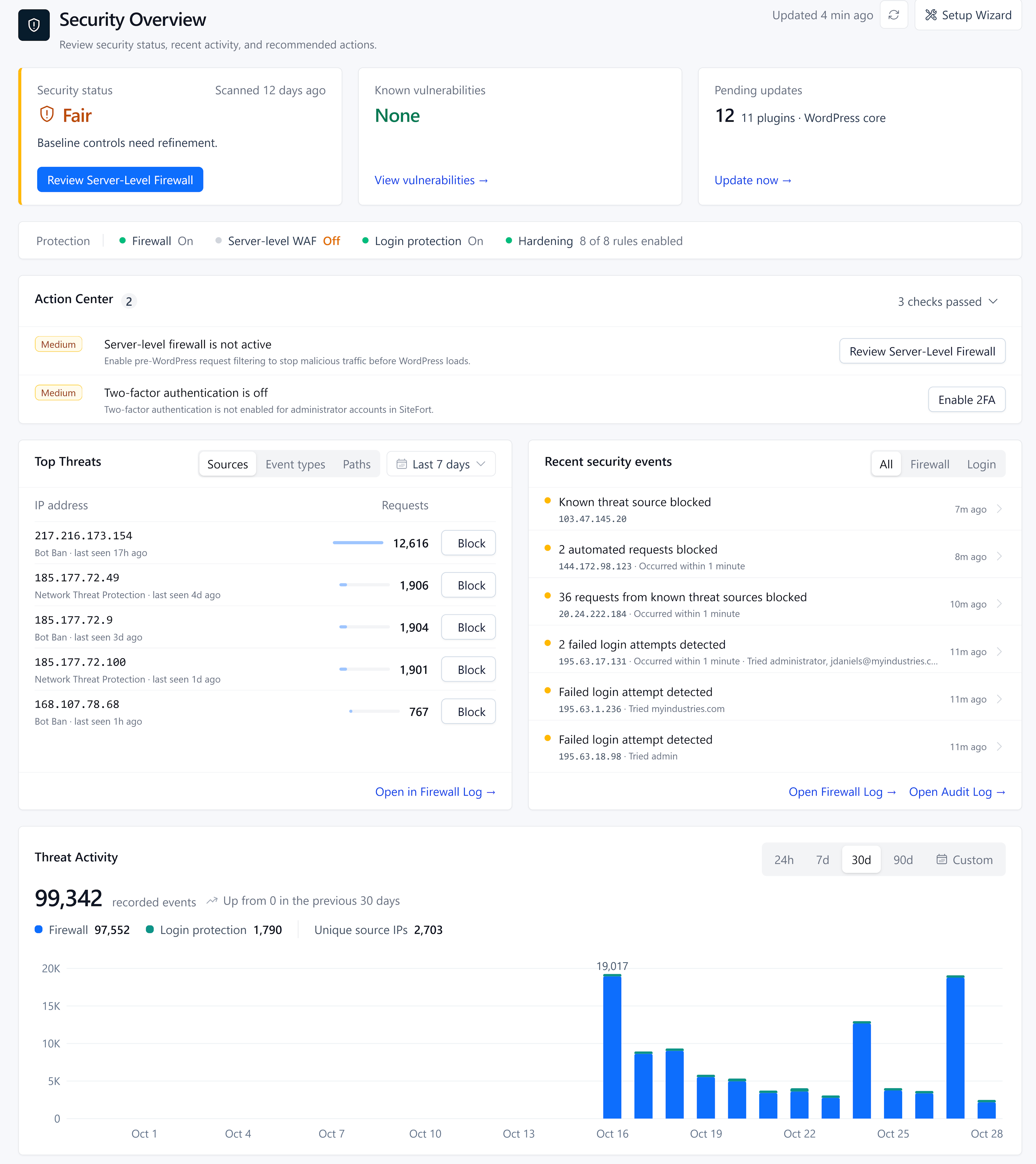
SiteFort is a WordPress security plugin that combines firewall protection, malware scanning, vulnerability detection, security hardening, login protection, and 2FA. Its firewall uses dynamic bot detection, rate limiting, and shared threat intelligence to identify and block abusive traffic. Supported firewall rules can also sync with Cloudflare to stop repeat offenders at the edge.
SiteFort’s cloud-assisted malware scanner uses hash-based file integrity checks to recognize known files and sends unknown or suspicious files for deeper cloud analysis. This reduces server load, making comprehensive security scanning practical even on shared and resource-limited hosting.
Core security features, including firewall protection, hardening, login security, 2FA, and vulnerability detection, are free forever.
Try the Live Demo | Features | Try Online Scanner
Core WordPress Security Features
- WordPress Security Hardening: Reduces common exposure through XML-RPC, user enumeration, sensitive files, direct PHP execution, REST access, security headers, and other WordPress security controls.
- Firewall & Bot Protection: Blocks known malicious IPs using network threat intelligence, filters vulnerability probes and abusive bots, and limits excessive requests. Includes configurable firewall rules and optional Cloudflare edge protection.
- Login Security & 2FA: Protects WordPress login, WooCommerce customer accounts, and membership account access with two-factor authentication, CAPTCHA, brute-force lockouts, a custom login URL, breached-password checks, and password policies.
- Vulnerability Scanner: Checks WordPress core, plugins, and themes for known vulnerabilities, affected versions, severity, CVE references where available, and remediation guidance.
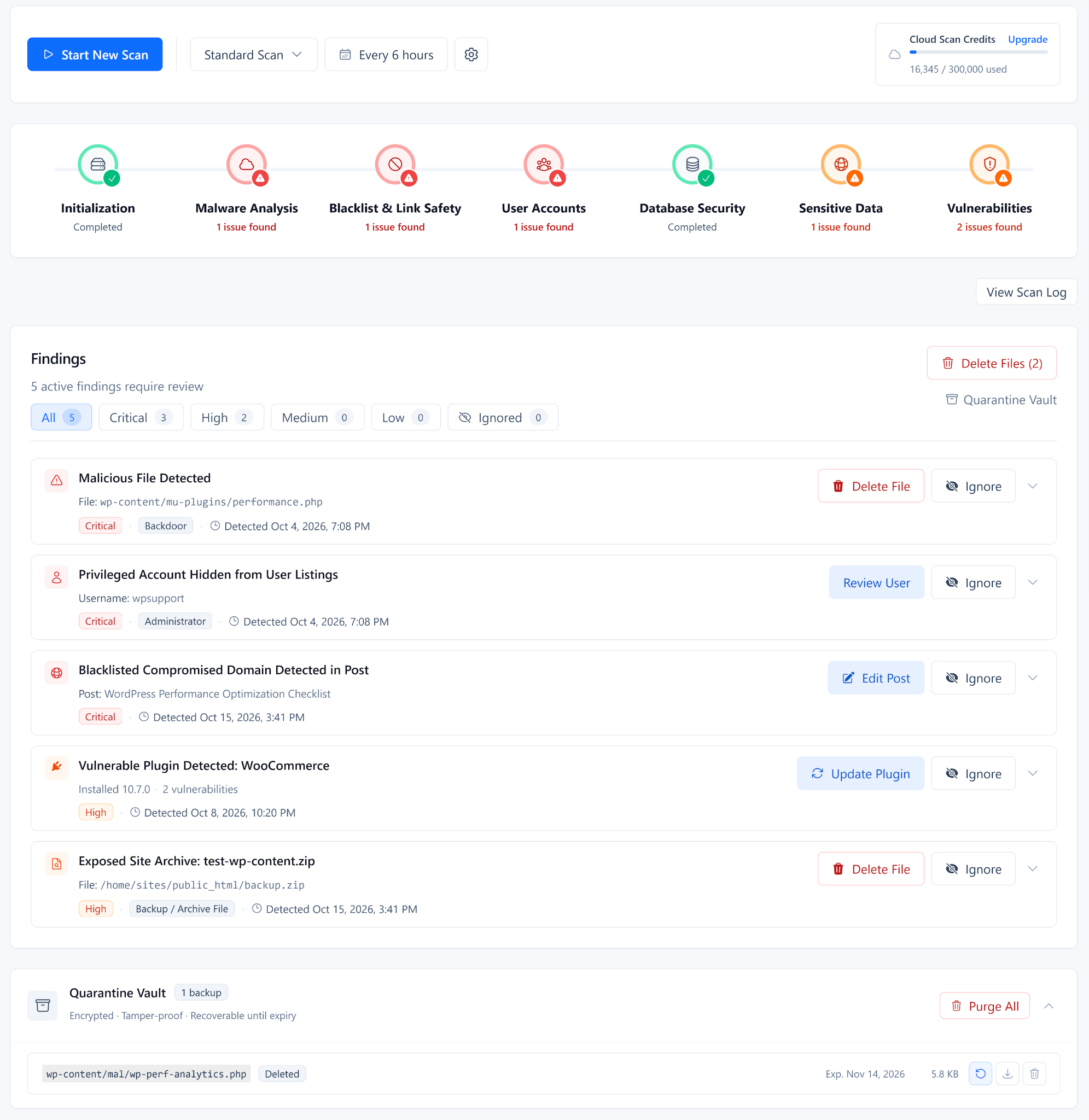
- Cloud-Assisted Malware Scanner: Detects backdoors, web shells, injected code, malicious redirects, SEO spam, and suspicious file changes, with deep threat analysis in the cloud to reduce server load.
- Compromise & Reputation Checks: Detects suspicious administrator accounts, injected content, unsafe URLs, exposed sensitive files, malicious redirects, and domain or server reputation issues.
WordPress Security Hardening
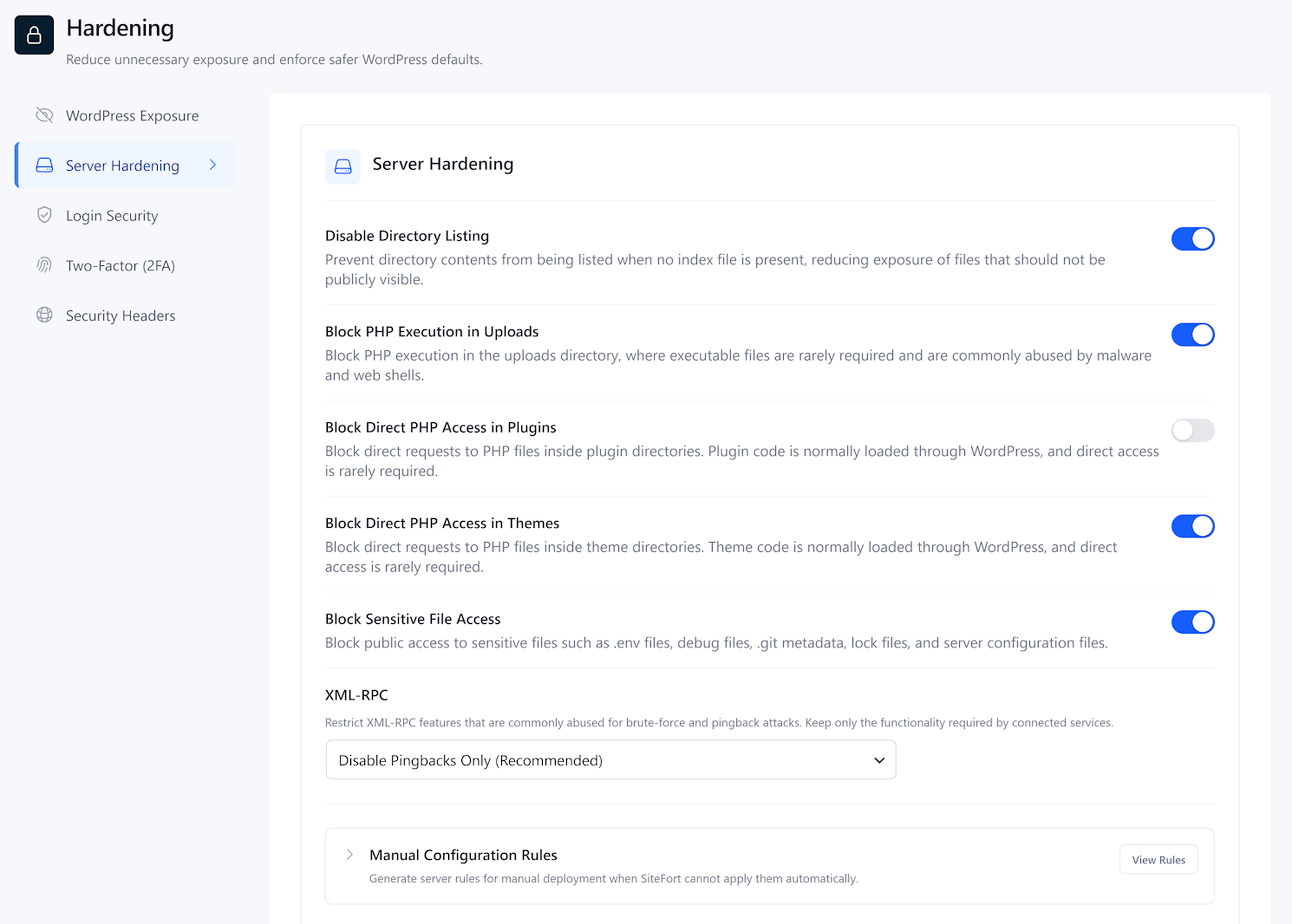
SiteFort provides simple, toggle-based WordPress hardening controls to reduce common security exposure and shrink the attack surface.
- Sensitive File Protection: Blocks public access to WordPress configuration backups, database dumps, debug logs, backup files, installer files, and other sensitive resources, including exposed
.envor.gitdata when present. - PHP Execution Protection: Blocks PHP execution in uploads and restricts direct access to PHP files in plugin and theme directories.
- XML-RPC Controls: Disable XML-RPC, restrict authentication, or block pingback abuse.
- User Enumeration Blocking: Reduces username exposure through author archives, REST endpoints, and common discovery paths.
- REST & Application Password Controls: Restricts REST API access and controls WordPress Application Passwords based on site requirements.
- File Editor Protection: Disables the built-in WordPress theme and plugin file editor.
- Directory Browsing Protection: Disables directory listing to reduce file discovery and unintended information exposure.
- Security Headers: Analyze and manage CSP, HSTS, X-Frame-Options, X-Content-Type-Options, Referrer-Policy, Permissions-Policy, and disclosure headers.
- Version & Metadata Cleanup: Reduces exposed WordPress version, generator, and header information.
- Protection Verification: Confirms supported hardening protections are active and identifies items that require manual hosting or server configuration.
WordPress Malware Scanner
SiteFort combines hash-first file verification with cloud-assisted deep threat analysis to detect malware while reducing scan workload on the WordPress server.
- Hash-First File Verification: Known WordPress core, plugin, and theme files are verified against trusted hashes.
- Deep Threat Analysis: Files that cannot be verified by hash or show suspicious indicators are sent to the SiteFort cloud for deep threat analysis, including backdoors, web shells, injected PHP or JavaScript, malicious redirects, SEO spam, and obfuscated code.
- File Integrity: Detects modified WordPress core, plugin, and theme files, along with unexpected files that do not belong in trusted packages.
- Account & Content Checks: Checks administrator accounts, WordPress content, options, URLs, and redirects for suspicious changes and indicators of compromise.
- Sensitive File Exposure: Identifies publicly accessible backups, logs, configuration files, debug files, and other sensitive files commonly targeted by attackers.
- Domain & IP Reputation: Checks the site domain and server IP against supported blocklists and abuse intelligence.
Database and content checks run locally. External link reputation checks use hashed data rather than uploading plaintext URLs or database content.
Login Security & 2FA
SiteFort protects WordPress login and account access against brute-force attacks, credential abuse, and unauthorized access.
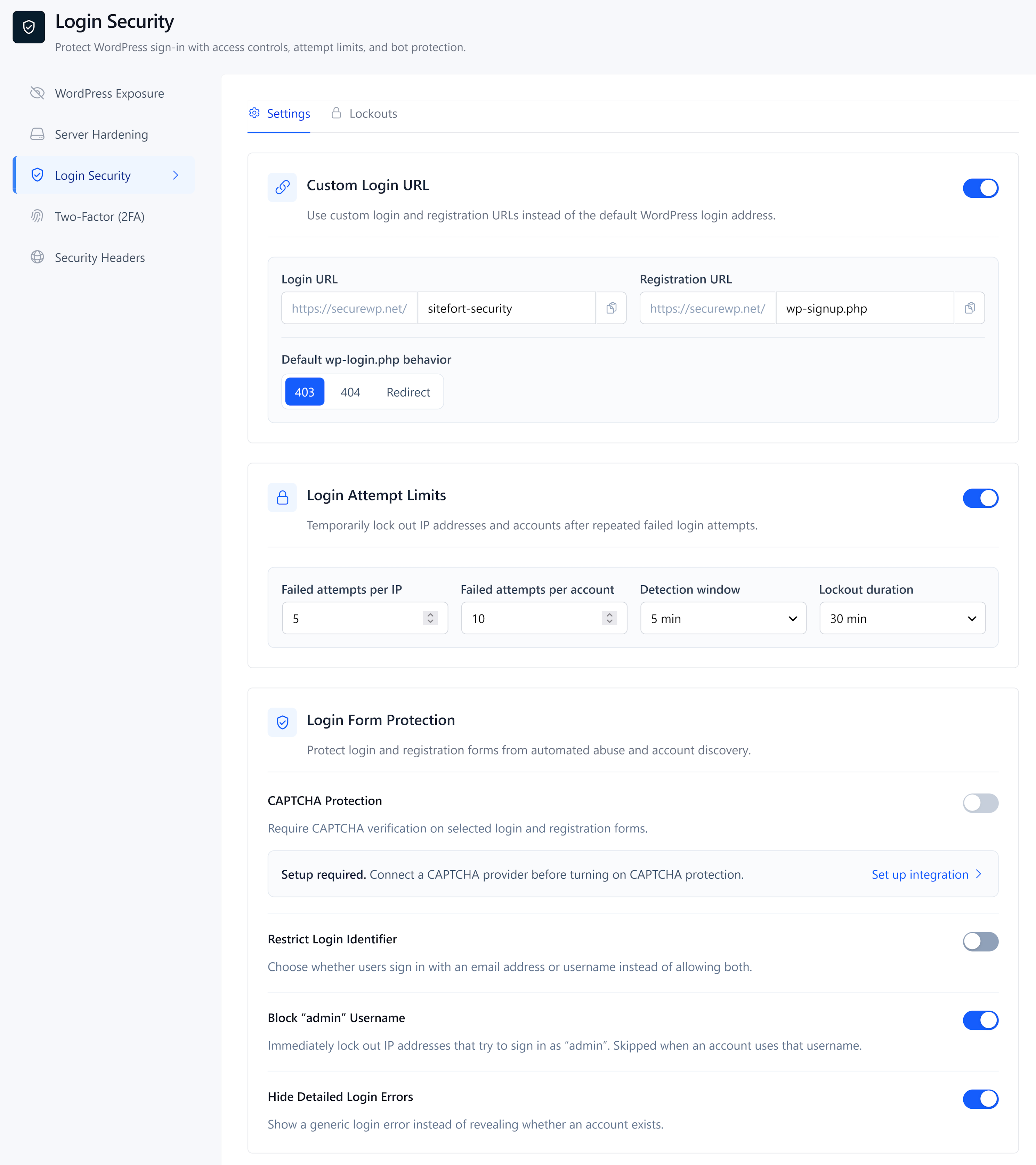
- Brute-Force & CAPTCHA Protection: Limits repeated login attempts and adds CAPTCHA protection to WordPress, WooCommerce, and supported custom login and registration forms.
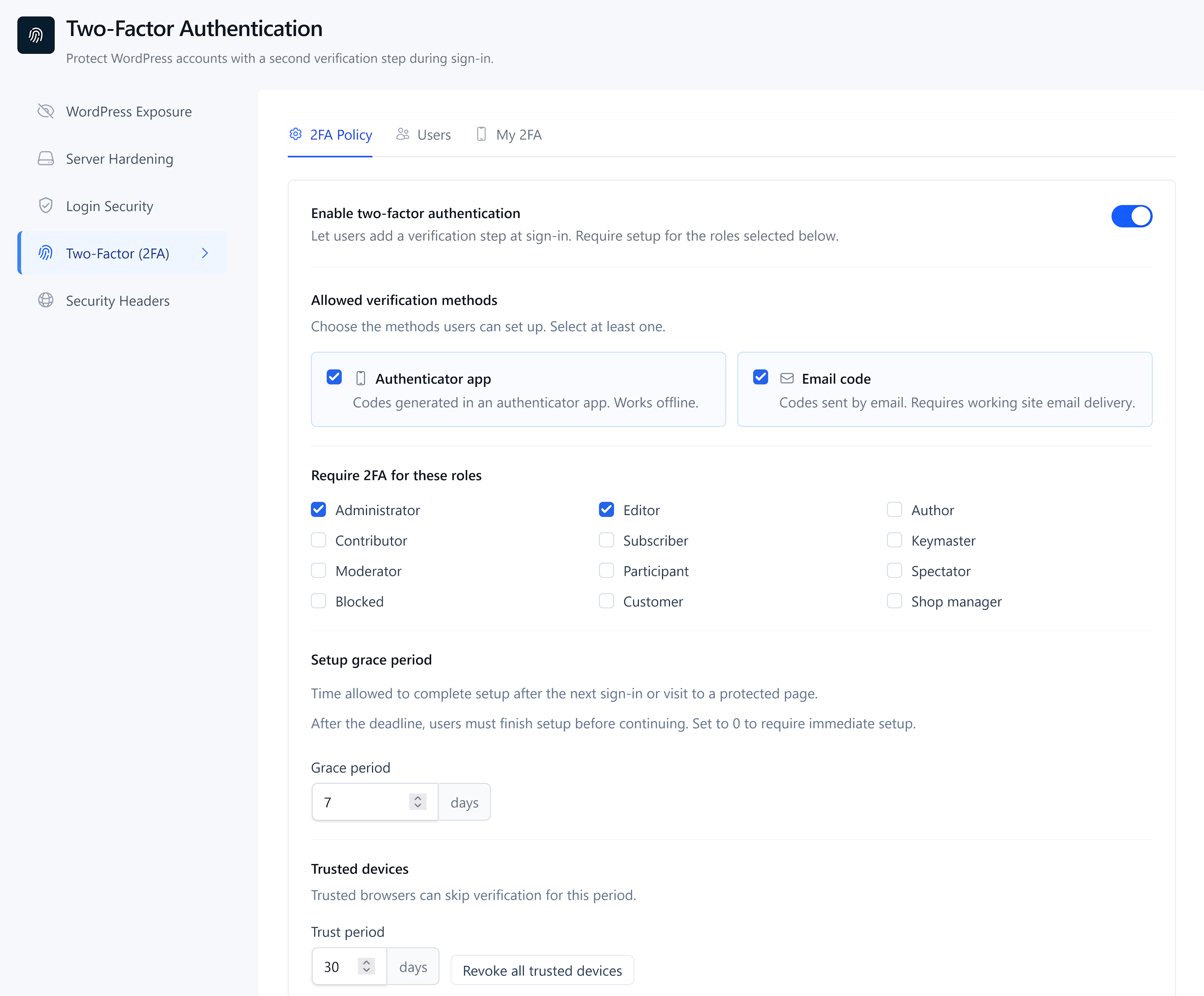
- Two-Factor Authentication: Adds role-based 2FA with authenticator apps, email codes, recovery codes, grace periods, and trusted devices.
- WooCommerce & Membership 2FA: Lets customers and members manage 2FA from WooCommerce My Account or supported custom account pages.
- Custom Login URL: Move the WordPress login page to a private URL and control requests to the default
wp-login.phpaddress. - Password Security: Detects weak and breached passwords, enforces password strength, prevents reuse, and supports optional expiration policies.
WordPress Firewall
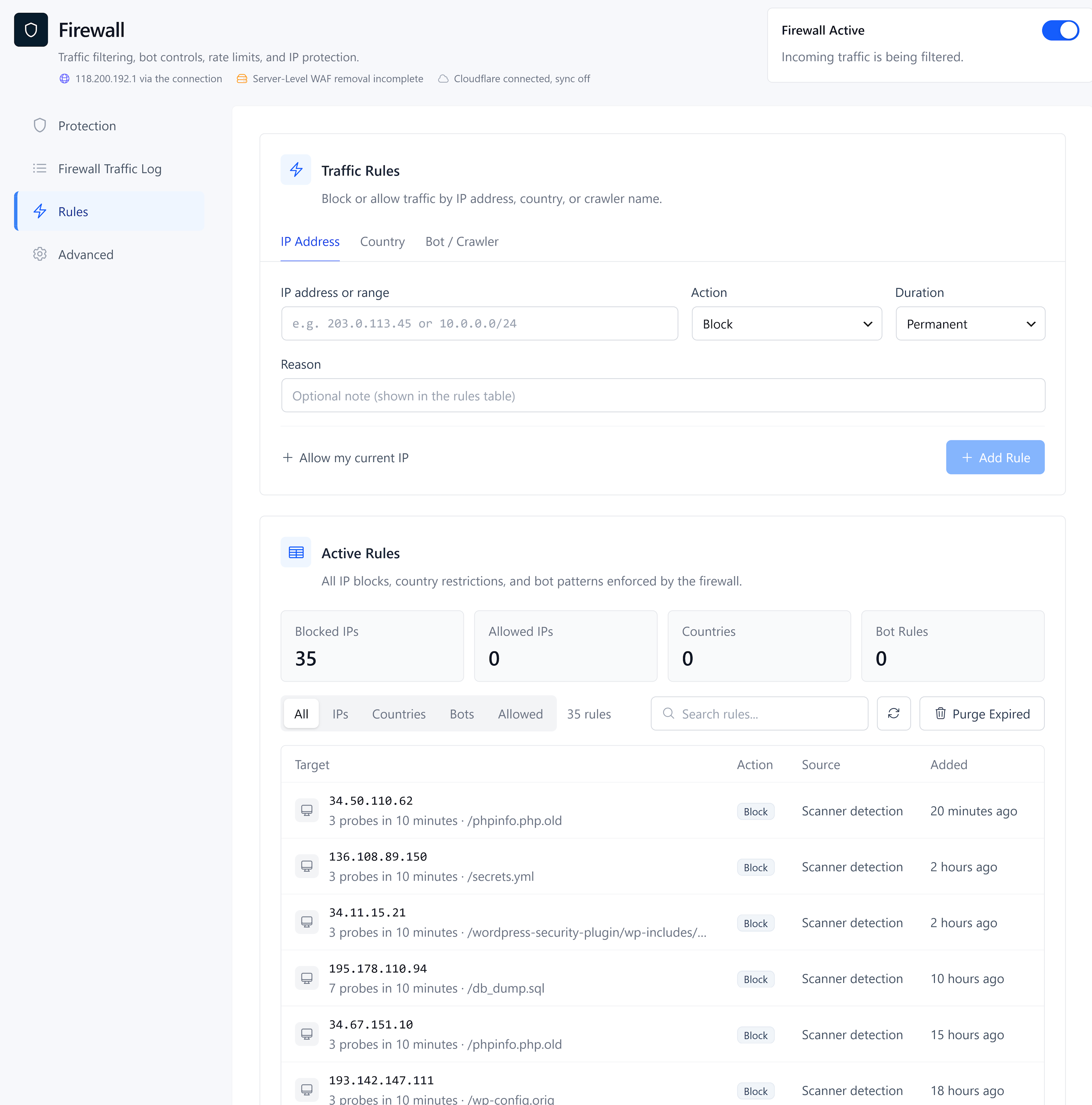
SiteFort filters malicious and abusive traffic early, with clear controls for IPs, countries, rate limits, sensitive paths, bots, and optional Cloudflare edge enforcement.
- IP, CIDR & Country Rules: Block or allow individual IP addresses, CIDR ranges, and countries, including an allow-only mode.
- Sensitive Path Probe Protection: Blocks requests probing for commonly targeted sensitive paths, including WordPress configuration backups, database dumps, debug logs, installer files,
.env, and.git. - Rate Limiting & 404 Controls: Reduces abusive request bursts, repeated missing-page requests, and automated scanning activity.
- Bot & User-Agent Controls: Block or allow selected bots, crawlers, scanners, and user agents with configurable firewall rules.
- Network Threat Protection: Automatically blocks known malicious IPs using threat intelligence shared across the SiteFort network, including threats identified on other protected websites.
- Vulnerability Probe Protection: Blocks automated requests searching for vulnerable plugins, themes, backup files, and configuration leaks.
- Cloudflare Sync: Synchronizes supported IP, country, and user-agent rules to Cloudflare, with temporary edge blocks for repeat attackers where supported.
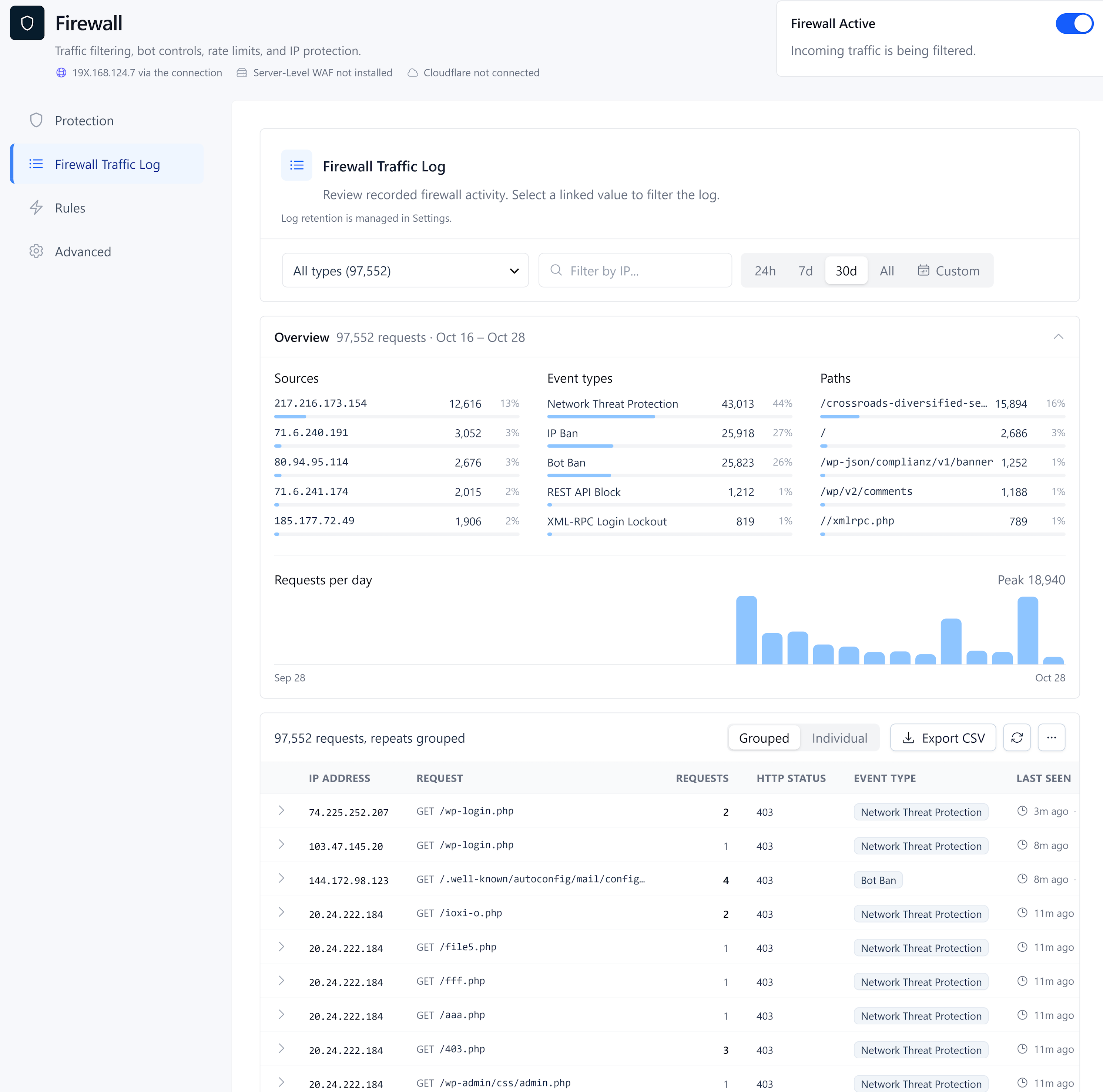
- Traffic Log: Review firewall traffic, blocked requests, bot activity, rate-limit events, and rule matches from the firewall dashboard.
Bot Protection Policy
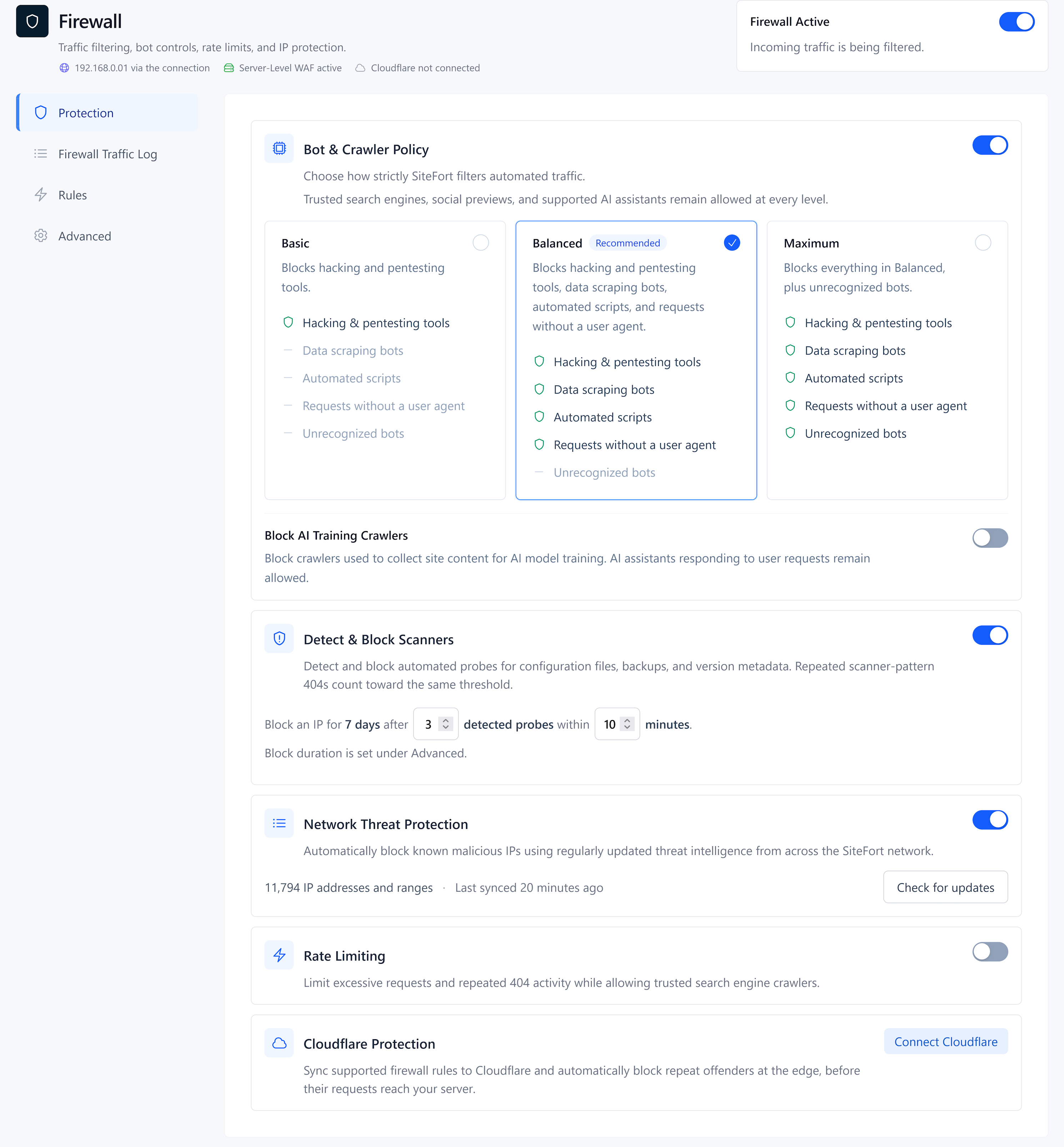
SiteFort provides three bot protection presets for straightforward setup, with the option to allow or block specific bots and crawlers individually.
- Basic: Blocks known hacking tools and bots probing for vulnerable files and common attack paths.
- Balanced: Adds protection against scraping bots and automated scripts. Recommended for most WordPress sites.
- Maximum: Extends filtering to unrecognized bot traffic for sites that require stricter automation controls.
- AI Training Crawlers: Optionally block training-focused crawlers such as GPTBot, ClaudeBot, CCBot, and Bytespider while supported AI assistants and AI search crawlers remain allowed.
Supported search crawlers are verified using reverse DNS and published IP ranges and are allowed through bot protection, while bots impersonating known search engines are detected and blocked.
Vulnerability Scanner
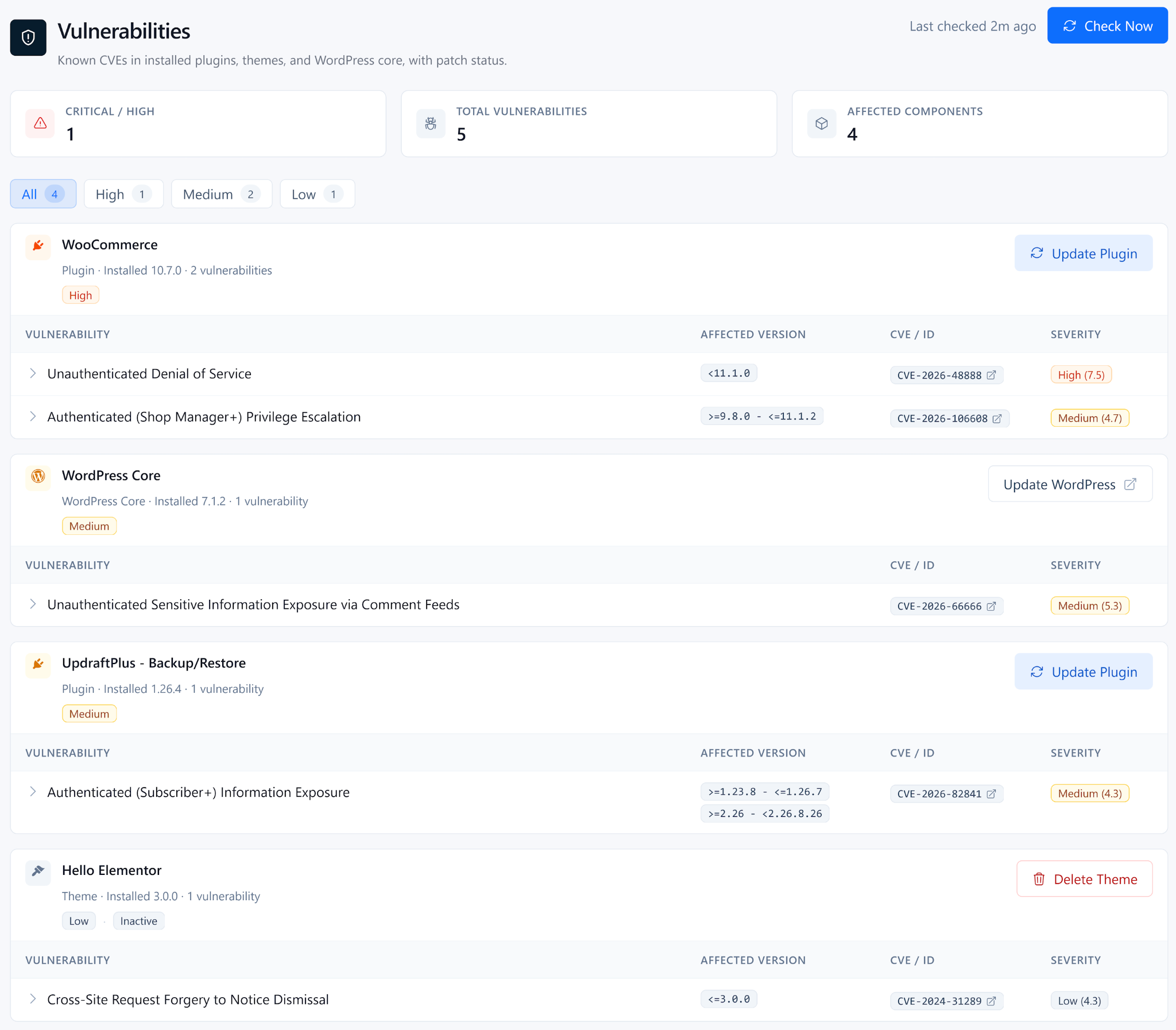
SiteFort checks installed WordPress core, plugins, and themes against vulnerability intelligence and identifies affected versions, severity, and available remediation.
- Affected Components: Identifies vulnerable WordPress core, plugins, and themes with installed versions, severity, and CVE references where available.
- Fix Guidance: Shows fixed versions and recommended actions when remediation information is available.
- Vulnerability Probe Protection: Firewall controls block automated discovery attempts targeting vulnerable plugins, themes, and known component paths while affected software is being updated, replaced, or removed.
SiteFort does not virtually patch vulnerable code. Vulnerable components should be updated, replaced, or removed using the available remediation guidance.
Malware Repair & Quarantine
- Delete or Quarantine (Free): Remove malicious or unwanted files from scan results, with optional quarantine for recovery when needed.
- One-Click Repair (Pro): Repairs malicious or modified files directly from scan results when a trusted clean source is available.
- Clean-File Restore (Pro): Restores supported WordPress core, plugin, and theme files, including selected commercial plugins and themes when verified clean sources are available.
For active WordPress compromises requiring hands-on investigation, Securewp expert cleanup is available for malware removal, root-cause remediation, blocklist assistance, and post-cleanup review.
WordPress Security Audit Log
SiteFort records important security and administrative activity, providing a clear history for review and investigation.
- Login Activity: Successful and failed logins, lockouts, 2FA events, and account-related activity.
- User Changes: User creation, updates, role changes, and other account actions.
- Plugin & Theme Activity: Installations, activations, deactivations, updates, and other recorded changes.
- Security & Settings Changes: Hardening, login security, firewall configuration, and other sensitive administrative changes.
SiteFort Console
SiteFort Console provides a central panel for managing security across multiple WordPress sites. No separate add-on is required; Console connectivity can be enabled or disabled directly from the SiteFort plugin.
- Run security scans and review findings across sites.
- Monitor vulnerabilities and update hardening settings remotely.
- Review security status, scan history, uptime, and SSL expiry.
- Route alerts and download reports for individual sites or clients.
- Manage team access and support workflows from one place.
All site-level security features remain available directly in WordPress; Console adds centralized management for multiple sites.
Hosting Compatibility
SiteFort supports shared hosting, managed WordPress hosting, VPS, and dedicated servers across Apache, Nginx, and LiteSpeed.
- Cloudflare: Works with Cloudflare-proxied sites and supports optional firewall rule sync for edge enforcement.
- Lower-Resource Hosting: Hash-first file verification and cloud-assisted deep analysis reduce scan workload on the hosting server.
- Flexible Server Support: Does not require a specific web server stack or managed hosting environment.
Free vs Pro
SiteFort Free includes security hardening, firewall and bot protection, network threat protection, login security and 2FA, vulnerability scanning, activity logging, and 10,000 monthly cloud file-analysis credits. Pro removes the cloud analysis limit and adds automation, repair, monitoring, alerts, and reporting.
SiteFort Pro adds:
- Unlimited deep threat analysis
- Scheduled malware scans and automated vulnerability alerts
- One-click malware repair and clean-file restore
- Uptime and SSL expiry monitoring
- Slack, Discord, email, and webhook alerts
- Remote scan history and detailed security reports
- White-label options for agencies
Managed adds hands-on monitoring, incident response workflows, and expert cleanup coverage from the Securewp team.
See the WordPress Security Plugin Comparison for a feature-by-feature comparison with other WordPress security plugins.
External services
SiteFort uses external services only for features that require them, including license activation, cloud-assisted malware analysis, vulnerability and firewall intelligence, reputation checks, optional Console sync, CAPTCHA, GeoIP, Cloudflare Sync, and administrator-configured notifications.
Optional integrations are not contacted unless they are enabled or used.
SiteFort Cloud
- Servers: securewp.net, intel.securewp.net, console.securewp.net
- Used for: Account activation, cloud malware analysis, vulnerability and reputation checks, Network Threat Protection, file repair, and optional Console sync.
- Data sent: Depending on the features used, SiteFort may send account email, license credentials, site URL, WordPress and plugin versions, installed components and versions, file hashes, scan findings, vulnerability and reputation results, attacker IP addresses, security events, and relevant configuration metadata.
- Malware scanning: File hashes are checked first. Only unknown or suspicious files may be uploaded for cloud analysis and are deleted after processing. Database checks run locally. Sensitive configuration values are removed before uploading
wp-config.php. - Reputation checks: External URLs and domains are hashed locally. SiteFort checks four-byte SHA-256 prefixes and sends full hashes only for possible matches. Plaintext URLs, database content, credentials, and query strings are not uploaded for this check. Temporary lookup data is cleared after scanning.
- Firewall IP verification: Works without an account. SiteFort uses a signed test request through intel.securewp.net to identify the correct visitor IP header, including when the site operates behind a proxy or CDN.
- Network Threat Protection: Requires a connected SiteFort account. SiteFort receives signed threat lists of known malicious IPs and ranges and shares detected attacking IPs with relevant security event details to improve protection across the network. Reports do not include request contents, passwords, cookies, or form data. Submitted reports are evaluated before contributing to network-wide blocking.
- Temporary storage: SiteFort Cloud may provide temporary
*.amazonaws.comURLs for malware analysis and clean-file restoration. - Privacy: https://securewp.net/privacy-policy/
- Terms: https://securewp.net/terms-and-conditions/
- Storage provider policies: AWS: https://aws.amazon.com/privacy/ and https://aws.amazon.com/service-terms/; Cloudflare: https://www.cloudflare.com/privacypolicy/ and https://www.cloudflare.com/website-terms/
Optional integrations
-
MaxMind GeoLite2 (download.maxmind.com): Used only when an administrator downloads or updates the local GeoIP database. The configured MaxMind account ID and license key are sent to MaxMind. Visitor IP addresses are resolved locally and are not sent to MaxMind during normal requests. Privacy: https://www.maxmind.com/en/privacy-policy Terms: https://www.maxmind.com/en/geolite2/eula
-
Have I Been Pwned Passwords (api.pwnedpasswords.com): Used for breached-password checks when enabled. SiteFort sends only the first 5 characters of the SHA-1 password hash. Full passwords and full hashes are not sent. Privacy: https://haveibeenpwned.com/Privacy Terms: https://haveibeenpwned.com/TermsOfUse
-
Google reCAPTCHA (www.google.com) and Cloudflare Turnstile (challenges.cloudflare.com): Used only when selected and configured for CAPTCHA protection. The selected provider receives the challenge token, site key, and visitor or browser data required to process the challenge. Policies: https://policies.google.com/privacy https://policies.google.com/terms https://www.cloudflare.com/turnstile-privacy-policy/ https://www.cloudflare.com/website-terms/
-
Cloudflare API (api.cloudflare.com): Used only when Cloudflare Sync is enabled. SiteFort sends the Zone ID, API token or credentials, zone details, blocked IP addresses, country rules, selected user-agent rules, and firewall rule data required for synchronization. Privacy: https://www.cloudflare.com/privacypolicy/ Terms: https://www.cloudflare.com/website-terms/
-
Notification webhooks: Security alerts may be sent to Slack (hooks.slack.com), Discord (discord.com, discordapp.com), or a custom HTTPS webhook configured by the administrator. Payloads may include site name, site URL, event type, severity, scan counts, vulnerability names, CVE identifiers, firewall counts, usernames, IP addresses, browser names, action URLs, timestamps, and event details. Slack policies: https://slack.com/trust/privacy/privacy-policy https://slack.com/terms-of-service/user Discord policies: https://discord.com/privacy https://discord.com/terms
Local site checks
Some SiteFort checks send loopback requests to the protected site’s own public URL, including security-header and public-file exposure checks. These requests contact the protected site itself, not a third-party service.
Screenshots



Installation
- Install and activate SiteFort from Plugins > Add New, or upload the plugin ZIP file.
- Open SiteFort in wp-admin and complete the setup wizard.
- Optional: activate a free SiteFort account to enable cloud-assisted scanning, vulnerability checks, and network threat protection.
- Review the recommended hardening, firewall, bot protection, login security, and 2FA settings.
- Run the first security scan and review the findings.
- Optional: configure Cloudflare protection under SiteFort > Firewall > Protection to extend supported firewall rules and repeat-offender blocking to the edge.
For manual installation, upload the extracted sitefort folder to /wp-content/plugins/ and activate SiteFort from the Plugins screen.
SiteFort requires outbound HTTPS for license activation, cloud-assisted scanning, threat intelligence updates, and optional Console sync.
FAQ
-
Can I try SiteFort before installing it?
-
Yes. A disposable WordPress demo with SiteFort preinstalled is available at https://demo.securewp.net/. No signup or installation is required, and the demo resets when the session ends.
-
How does SiteFort work on WordPress multisite?
-
Network-activate SiteFort and manage it from Network Admin. The installation shares one security policy, cloud connection, file scanner, IP-ban store and account 2FA enrollment. Subsites inherit protection automatically; they do not need separate manual activation. Existing plan limits and shared scan credits still apply.
Database-content checks traverse active sites in resumable batches and keep each finding tied to its source site. Site administrators cannot change the shared policy; account owners can still manage their personal 2FA. Cloudflare synchronization applies to its configured zone, which may not include every mapped domain.
For multiple WordPress networks sharing one installation, activate the primary network first and deactivate it last. Shared early-firewall and server rules affect the shared installation. Fresh multisite setup is supported; automatic consolidation of old per-site connections and conversion of an already connected standalone site require a separate reviewed workflow.
-
Does SiteFort support WooCommerce, membership sites, and custom login pages?
-
Yes. When SiteFort 2FA and WooCommerce are enabled, customers can manage two-factor authentication from My Account Account security. SiteFort can also add 2FA management to membership sites, LMS dashboards, client portals, and other custom account pages. CAPTCHA protection supports WooCommerce login and registration and can also be added to supported custom login and registration forms. See the SiteFort hardening documentation for custom integration details.
-
How does the SiteFort malware scanner work?
-
SiteFort verifies known files by hash and sends only unknown or suspicious files for deeper cloud analysis. This reduces scan workload on the hosting server while still providing deep threat analysis for files that require it. Database and content checks remain on the protected site.
-
Does SiteFort send WordPress database content to the cloud?
-
No. Database and content checks run on the protected site. File hashes are sent first, and only files that cannot be verified by hash may be uploaded for deeper analysis. If
wp-config.phprequires analysis, sensitive configuration values are removed before upload. -
Will SiteFort bot protection affect Google or other search engines?
-
SiteFort can verify supported search crawlers using reverse DNS and published IP information where available. This helps distinguish legitimate crawlers from requests impersonating known search engines.
-
Does SiteFort support Cloudflare?
-
Yes. SiteFort supports Cloudflare-proxied WordPress sites and can synchronize supported IP, country, and user-agent firewall rules using a scoped API token.
-
Does SiteFort support country blocking?
-
Yes. Country rules support both block-selected and allow-only modes. Country detection can use Cloudflare country information on proxied sites or a locally installed MaxMind GeoLite2 database.
-
Does SiteFort virtually patch vulnerable plugins or themes?
-
No. SiteFort identifies known vulnerabilities and provides affected-version, severity, CVE, and remediation information where available. Firewall controls can reduce automated discovery attempts while vulnerable software is updated, replaced, or removed.
-
Can SiteFort help with an already compromised WordPress site?
-
Yes. SiteFort can identify malware, suspicious administrator accounts, injected content, exposed files, and other indicators of compromise. Free includes file quarantine, while Pro adds one-click repair and clean-file restore for supported files. Securewp expert cleanup is also available for incidents requiring hands-on investigation.
-
Yes. SiteFort supports shared hosting, managed WordPress hosting, VPS, dedicated servers, Apache, Nginx, LiteSpeed, and Cloudflare-proxied environments. Hash-first verification and cloud-assisted deep analysis help reduce scan workload on the hosting server.
-
Is SiteFort Console required?
-
No. Site-level security features are available directly from the WordPress dashboard. SiteFort Console is optional for centralized multi-site visibility, reporting, alert routing, uptime and SSL monitoring, and team workflows.
-
Do I need a SiteFort account?
-
No account is required for local security hardening, firewall controls, login protection, or 2FA.
A free SiteFort account is required for cloud-assisted scanning, vulnerability checks, and network threat protection. No paid subscription is required. -
How is SiteFort Pro activated?
-
Open SiteFort > Settings > License and Plan and activate using the email address associated with the purchase or a license key. An existing free license associated with the same email upgrades in place.
Reviews


Contributors & Developers
“SiteFort Security – Firewall, Malware Scanner & Hardening” is open source software. The following people have contributed to this plugin.
Contributors
Translate “SiteFort Security – Firewall, Malware Scanner & Hardening” into your language.
Interested in development?
Browse the code, check out the SVN repository, or subscribe to the development log by RSS.
Changelog
2.0.5 – 2026-11-04
- Made license activation and email verification clearer and easier to use.
- Updated the SiteFort logo in the admin menu, block pages and emails.
2.0.4 – 2026-11-03
- Fixed settings import losing firewall rules that span multiple lines.
- Fixed blocked IPs from SiteFort Console presets not being applied.
- Temporary IP bans now stay on site and are no longer sent to SiteFort Console.
- Settings export now includes custom login URL and notification emails. Passwords, keys and connections stay on each site.
2.0.3 – 2026-10-30
- Fixed scans uploading every file when the cloud service was briefly unavailable.
- Fixed long scans stopping or skipping files that had scan credits.
- Improved scan recovery from temporary database errors.
- Improved SiteFort Console syncing to follow the connection setting in Settings > Integrations.
- Added Mark as Fixed for scan findings in SiteFort Console.
2.0.2 – 2026-10-28
- Improved account lockouts to prevent failed attempts elsewhere from blocking previously signed-in browsers. Failed 2FA lockouts still apply to all browsers.
- Added a Wordfence 2FA migration tool to import existing authenticator setups and unused recovery codes without requiring users to reconfigure their apps.
- Reorganized Login Security with separate Settings and Lockouts tabs and dedicated login attempt controls.
- Improved lockout management with clearer reasons, expiry countdowns, and Audit Log links.
- Refined the Dashboard, Firewall Traffic Log, and security settings for better usability and consistency.
2.0.1 – 2026-10-24
- Fixed an issue where scans could remain in progress indefinitely. Scans that exceed the maximum run time now stop while preserving any results found so far.
2.0.0 – 2026-10-24
- Added WordPress Multisite support. Manage security settings for the network from Network Admin and connect the network to SiteFort Console with a single account. New sites inherit the network’s protection settings.
- Extended database scans to all sites in a multisite network. Interrupted scans resume from their last saved progress.
- Renamed Community IP Blocklist to Network Threat Protection. Connect your site to a SiteFort account to receive threat intelligence updates. The threat list is downloaded only when it changes.
- Added support for updating plugins and deactivating them across a network from SiteFort Console. Plugin activation and theme changes remain under local control in Network Admin.
- Standardized settings screens and added warnings when leaving a page with unsaved changes.
- Fixed scan exclusions such as wp-content/cache/* being ignored when entered without a leading slash.
- Updated the Audit Log to identify events from deleted user accounts rather than attribute them to «System».
- Improved security-key recovery after an interrupted update and strengthened verification of incoming requests.